Blank Error Message on vRSLCM 8.8.x when we check for System Upgrade

When you perform an upgrade to latest version of vRSLCM that's 8.8.2.3 and you perform a "Check for Upgrade" it would throw a red banner which looks like an exception with no message
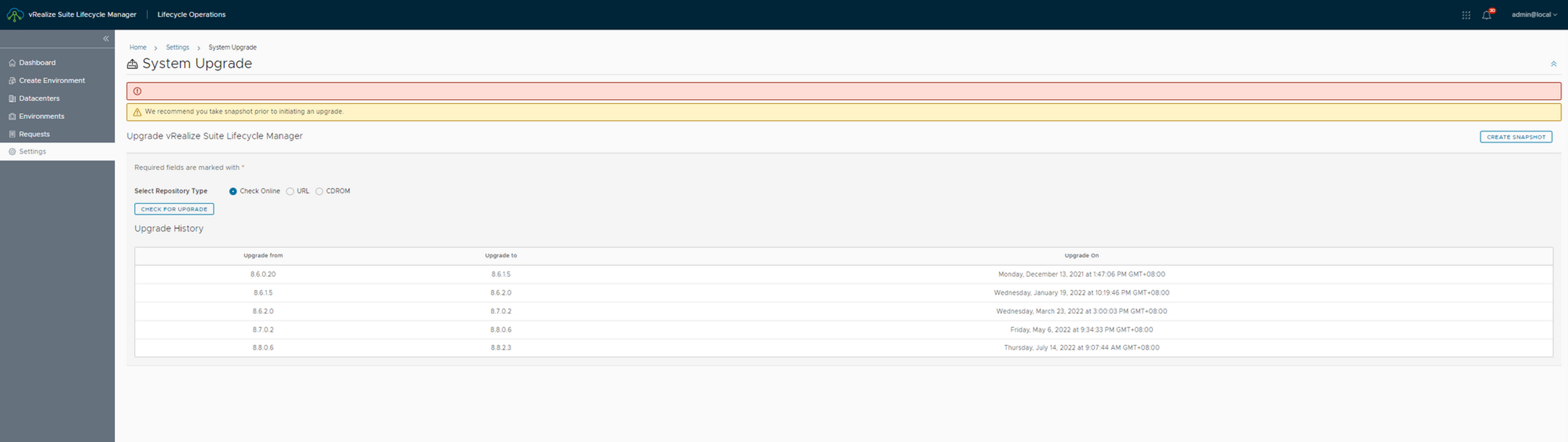
This is a cosmetic issue and has no impact of product functionality
Ideally , when your on latest version of vRSLCM , then you perform a system upgrade check you would be returned that there is no upgrade available.
This is still the behavior in the background. Due to a known issue instead of a message we get an exception.
This behavior is being fixed in upcoming release of vRSLCM
From logs perspective , when you click on "check for upgrade" this is what happens in the background
Reference: vmware_vrlcm.log
## checks if it's a vcf based env, it's not ##

2022-08-11 08:29:17.676 INFO [http-nio-8080-exec-4] c.v.v.l.l.c.DeploymentsController - -- is vcF user ::false

## executes update check command ##

2022-08-11 08:29:17.677 INFO [http-nio-8080-exec-4] c.v.v.l.u.ShellExecutor - -- Executing shell command: /opt/vmware/bin/vamicli update --check
2022-08-11 08:29:17.679 INFO [http-nio-8080-exec-4] c.v.v.l.u.ProcessUtil - -- Execute /opt/vmware/bin/vamicli

## result returned is absolutely right. There are no further upgrades available for 8.8.2 ##

2022-08-11 08:29:18.582 INFO [http-nio-8080-exec-4] c.v.v.l.u.ShellExecutor - -- Result: [Checking for available updates, this process can take a few minutes...
.
Available Updates -
No available updates found].
2022-08-11 08:29:18.583 INFO [http-nio-8080-exec-4] c.v.v.l.u.u.LCMUpgradeUtil - -- Output of update check : Checking for available updates, this process can take a few minutes...
.
Available Updates -
No available updates found

2022-08-11 08:29:18.583 INFO [http-nio-8080-exec-4] c.v.v.l.l.c.DeploymentsController - -- Authentication object is not null org.springframework.security.authentication.UsernamePasswordAuthenticationToken@fe908ae6: YXYXYXYX org.springframework.security.core.userdetails.User@c220133a: Username: admin@local; Password: YXYXYXYX Enabled: true; AccountNonExpired: true; credentialsNonExpired: true; AccountNonLocked: true; Granted Authorities: LCM_ADMIN; Credentials: [PROTECTED]; Authenticated: true; Details: org.springframework.security.web.authentication.WebAuthenticationDetails@957e: RemoteIpAddress: 127.0.0.1; SessionId: null; Granted Authorities: LCM_ADMIN

## Ideally or in the previous versions following message would be displayed in UI stating "No upgrade available"

2022-08-11 08:29:18.583 INFO [http-nio-8080-exec-4] c.v.v.l.l.c.DeploymentsController - -- is vcF user ::false
2022-08-11 08:29:18.583 INFO [http-nio-8080-exec-4] c.v.v.l.u.u.LCMUpgradeUtil - -- No upgrade available.

## Now we get a banner with an incomplete error which ideally should not be the case due to this below error ##

2022-08-11 08:29:18.583 ERROR [http-nio-8080-exec-4] c.v.v.l.l.c.InputValidationExceptionHandlingController - -- Handling InvalidInputException with error message: null
Never miss a post
New guides on VMware Cloud Foundation, Aria Suite, and infrastructure automation. Follow the blog in your feed reader and new posts show up as soon as they are published.
Using a different reader? Copy the feed URL and add it there.