Managing Passwords in VCF 9.1

In VCF 9.0 you change a password. In VCF 9.1 you can write a rule and have the fleet hold to it.
That is the difference in one line, and it is a bigger change than it sounds, because a policy is an object you assign rather than an action you run.
The short version
VCF 9.1 adds password policies. Length, complexity, history, expiration and lockout, bundled into a policy you assign at fleet, management component or instance level.
CyberArk integration arrives. VCF Operations can sit in front of a CyberArk vault through a marketplace plugin.
What VCF 9.0 gives you
The VCF 9.0 page describes three actions.
| Action | What it does | Where you do it |
|---|---|---|
| Update | Changes the password on the server side and on the client side | VCF Operations |
| Remediate | Provides the new password on the client side after it was changed on the server | VCF Operations |
| Rotate | Changes to an auto generated password on both sides | SDDC Manager |
It covers the management components, Fleet Management, VCF Automation, VCF Identity Broker, VCF Operations, VCF Operations for Logs and VCF Operations for Networks, plus the instance components, ESX, NSX Manager, vCenter and SDDC Manager, where the backup password is in scope.
One operational detail worth knowing: password information in VCF Operations is refreshed once a day. For real-time state, use the API.
What a VCF 9.1 policy controls
| Attribute | Default | Allowed range |
|---|---|---|
| Minimum length | 15 characters | 8 to 64 |
| Required character types | 1 uppercase, 1 lowercase, 1 numeric, 1 special | n/a |
| Password history | Rejects the previous 5 | 1 to 10 |
| Expiration | 365 days | 30 to 730 |
| Account lockout | 3 failed attempts | 0 to 5 |
| Lockout evaluation window | 900 seconds | 300 to 1800 |
| Lockout duration | 900 seconds | 600 to 1800 |
Fifteen characters as the default minimum is the one to share with whoever owns your standards document, since it sits above what many existing policies ask for.
Where the passwords live
SDDC Manager keeps a copy. From the documentation: "SDDC Manager stores a copy of an account password in a local, internal vault." That copy is what makes credential lookup possible, and it is what the Remediate action keeps in step when a password is changed on the component itself.
VCF Operations does not. The VCF 9.1 documentation puts it in one sentence: "VCF Operations does not store a copy of an account password in a local vault."
The docs also give the benefit directly: "changing an account password where the account resides does not affect the ability of VCF Operations to update that password (on both the client and the server)." Change a password on a component and VCF Operations carries on working, because there is no second copy to keep aligned. That is why VCF Operations is the recommended way to manage passwords in VCF 9.1.
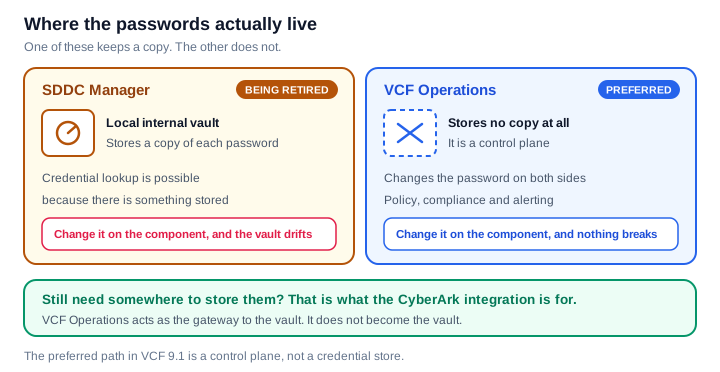
If you want a credential store, that is what the CyberArk integration is for. VCF Operations acts as a secure gateway between VCF components and the CyberArk vault, which gives you centralised storage, automated rotation and audit ready reporting, with VCF Operations as the gateway rather than the vault.
Where a policy applies, and which one wins
A policy can be assigned to the entire VCF fleet, to the VCF management components, or to an individual VCF instance. Every fleet object carries one active policy.
When two overlap, the narrower one wins: "The instance-level policy takes precedence over the fleet-level policy."
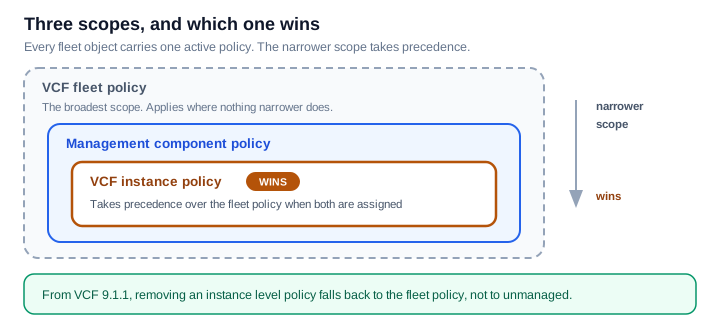
From VCF 9.1.1, removing an instance level policy drops that object back to the fleet policy, so it stays covered.
Five things worth knowing
Expiration and lockout apply the moment the policy does. They take effect on apply rather than at the next password change.
Expiration is calculated from the last password update. If your policy specifies an N day interval and the last update was N+1 or more days ago, that account expires when the policy is applied. The docs give the matching advice: before applying a policy, make sure passwords have been updated within the new expiration interval.
Allow about half an hour after deploying management services. From the docs: "Password policy operations might fail if they are started right after VCF management services deployment completes. After deployment, the Salt RaaS component requires approximately 30 minutes to establish connections to all managed nodes."
Non-expiring accounts are not enforced by default. Expiration and lockout are left off for them unless you enable it through the API. The same applies to the vCenter administrator@vsphere.local account, which you can bring under policy using the vCenter API com.vmware.identity.admin.administrator.PasswordPolicy.
In VCF 9.1.1, a locked account raises an alert in VCF Operations. You can update the password while it is locked, and unlocking is a separate step.
What changed, page by page
The documentation structure is a neat summary of the release.
| Child page under Managing Passwords | VCF 9.0 | VCF 9.1 |
|---|---|---|
| Default password requirements | Yes | Yes |
| Update passwords | Yes | Yes |
| Reset passwords | Yes | Yes |
| Passwords and certificates container | Yes | Yes |
| Password policies | No | Yes |
| Using SDDC Manager to manage passwords | No | Yes |
Two pages are new in VCF 9.1: one introduces password policies, and one gathers the SDDC Manager material into a single place.
Putting it to use
On VCF 9.0, use update and remediate, and keep the once a day refresh in mind when you are looking at password information.
On VCF 9.1, create a policy and assign it at fleet level first, then override at instance level where you have a reason to. Check when passwords were last updated before you set an expiration interval, because of the calculation above. If compliance matters to you, decide deliberately about non-expiring accounts and the vCenter administrator account rather than leaving them at the default.
Sources
- Managing Passwords for VCF Components, VCF 9.1
- Password Policies in VCF, VCF 9.1
- Managing Accounts and Passwords, VCF 9.0
Checked on 1 October 2026. Defaults and ranges are revised between releases, so confirm against the page for your exact build before you commit a policy to a change window.
Never miss a post
New guides on VMware Cloud Foundation, Aria Suite, and infrastructure automation. Follow the blog in your feed reader and new posts show up as soon as they are published.
Using a different reader? Copy the feed URL and add it there.