Patched the Migration Service Engine First? Here Is the Way Out

I have written before that VCF Automation has to be patched before the Migration Service Engine. This post is for the people who found that out the hard way.
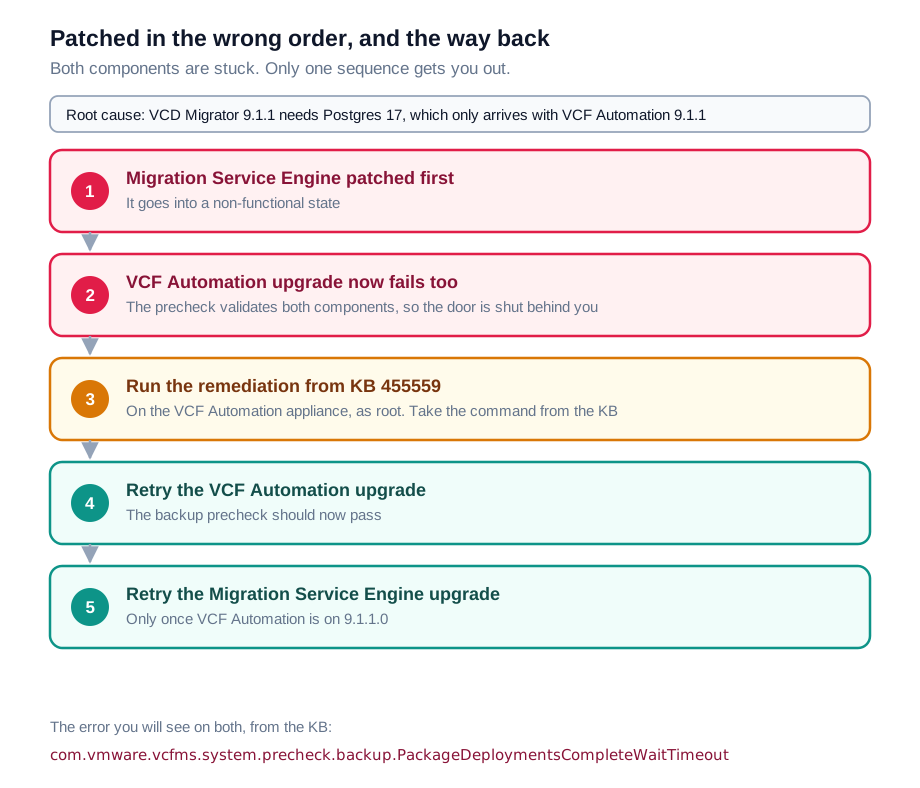
The unpleasant part is not that the Migration Service Engine patch fails. It is that it takes VCF Automation down with it. Once the Migration Service Engine is in a bad state, the VCF Automation upgrade will not run either, so the obvious instinct of "fine, I will just patch VCF Automation now and come back to it" does not work.
There is a documented way out. It is Broadcom KB 455559.
What you will see
Both upgrades fail with the same error:
com.vmware.vcfms.system.precheck.backup.PackageDeploymentsCompleteWaitTimeout
It appears first on the Migration Service Engine upgrade, which is the one you should not have started. Then it appears again when you try to upgrade VCF Automation to 9.1.1.0, which is the moment most people realise they are properly stuck rather than just one patch behind.
Why both are stuck
The KB is specific about the cause, and it is worth understanding rather than just running the fix.
VCD Migrator 9.1.1 requires Postgres 17, and Postgres 17 only arrives with VCF Automation 9.1.1. Patch the Migration Service Engine first and it is reaching for a database version that is not there yet. It does not fail cleanly, it settles into a non-functional state.
That is the first half. The second half is why VCF Automation then refuses to move. Its precheck validates the health of both components, so a broken Migration Service Engine is enough to fail the precheck for VCF Automation. One wrong patch has locked the door behind it.
The recovery
The KB gives four steps. In outline:
1. Get on to the VCF Automation appliance. SSH in as vmware-system-user, which is the only account that can, and elevate:
ssh vmware-system-user@<vcfa-fqdn>
sudo -i
2. Run the remediation script from the KB. The article supplies a single long command, a base64 encoded payload piped into tar and then into bash.
Take that command from the KB itself, not from anywhere else. I have deliberately not reproduced it here. It is an opaque blob, it may well be revised, and you should be copying it from Broadcom rather than from a blog. That goes for any encoded payload you are about to run as root.
Two things to watch for in the output:
- Success looks like the command ending on
Suspend has held for 70s. - If you see
REMEDIATION INCOMPLETE, or the script declines to run because the failure conditions on your system do not match what it expects, stop there. Do not force it. That is the point to raise a case rather than improvise.
3. Retry the VCF Automation upgrade from Fleet Lifecycle Management. The backup precheck that was failing should now pass, and the upgrade should run normally.
4. Retry the Migration Service Engine upgrade, once VCF Automation is actually on 9.1.1.0. This is the order it should have gone in originally, and now it will work.
The order of those last two steps
It is tempting, once the remediation script has run and things look healthier, to go back and finish the Migration Service Engine upgrade first, since that is the one that failed. Do not.
The whole reason this happened is that the Migration Service Engine needs what VCF Automation 9.1.1.0 brings with it. The remediation clears the blockage, it does not change that dependency. VCF Automation still goes first.
Avoiding it next time
The release notes state it plainly: before you patch the migration service engine component from 9.1.0.0 to 9.1.1.0, you must first patch VCF Automation.
For the full sequence across every management component, see Patching order for VCF Management Components, 9.1 to 9.1.1. For what the failure looks like when you get the order wrong, and the other ordering constraints in this release, see Patch VCF Automation before the Migration Service Engine.
And if anything in your environment does not match what the KB describes, that is a case for Broadcom Technical Support rather than a thing to work around.
Never miss a post
New guides on VMware Cloud Foundation, Aria Suite, and infrastructure automation. Follow the blog in your feed reader and new posts show up as soon as they are published.
Using a different reader? Copy the feed URL and add it there.