Skipping VCF Automation During a Brownfield Converge

A question that comes up often in brownfield conversations: if I already run VMware Aria Automation, do I have to let VCF Installer deploy a brand new VCF Automation while I converge, and then deal with two of them?
You do not. You can tell VCF Installer to leave VCF Automation alone, finish the converge, and then bring your existing Aria Automation into the fleet and upgrade it. This is a documented path, not a workaround, and it shows up in three separate places in the VCF 9.1 documentation.
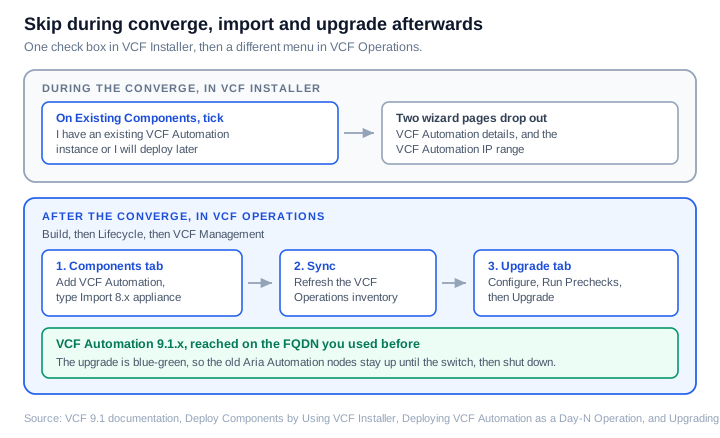
Where the option lives
On the Existing Components page of the VCF Installer deployment wizard there is a check box labelled I have an existing VCF Automation instance or I will deploy later. One check box covers two different situations, which is worth reading twice before you tick it. Selecting it means VCF Automation is handled as a Day-N operation instead of through the installer workflows.
The converge page states it plainly: VCF Installer allows you to skip VCF Automation during the initial deployment and deploy it as a Day-N operation.
What skipping changes in the wizard
Two things disappear, and both are the sort of thing you notice only when you go looking for them.
The VCF Automation details section does not appear on the VCF Management page, so you are not asked for a VCF Automation FQDN or a VCF services runtime FQDN for it. The VCF Automation IP Range field also disappears from the networks page, which means you do not need to set aside five addresses at converge time.
That second one has a practical benefit. The addresses you would have reserved for a new instance are addresses you do not have to find, and the existing Automation nodes keep the ones they already hold.
Coming back through VCF Operations
This is the part people miss, because it is not in the installer at all. You come back through VCF Operations.
Navigate to Build, then Lifecycle, then VCF Management, and open the Components tab. From the Add Component menu, select VCF Automation. The wizard asks for a Deployment Type, and that is where the two paths separate.
| Deployment type | What it does |
|---|---|
| New | Deploys a fresh VCF Automation instance. You pick a profile and a size |
| Import 8.x appliance | Imports the VMware Aria Automation 8.x appliance that you plan to upgrade |
The documentation is specific about when the second option applies: choose it if you are upgrading from VCF 5.x to VCF 9.1, or converging from vSphere to VCF 9.1. Both of those describe a brownfield estate, which is exactly the case we are talking about.
One small inconsistency to be aware of. The Day-N page calls the option Import 8.x appliance, while the import procedure page calls it Import vRealize Automation 8.x or VCF Automation 9.0.x. Same option, two labels, so match on the intent rather than the exact string.
After the import, click Sync on the Components tab to refresh the VCF Operations inventory. The upgrade cannot proceed until the inventory reflects what you just imported.
The upgrade itself
With the instance imported, move to the Upgrade tab. Next to the VCF Automation instance, click Configure to set the parameters, then Run Prechecks, then Upgrade.
The upgrade is a blue-green deployment.
A few details are useful to know in advance:
- The FQDN you already use to reach the Automation UI is transferred to the 9.1 instance, so the address your users have bookmarked stays the same.
- If you upgrade from Aria Automation 8.18.x, the IP addresses of the existing nodes become VIPs for the 9.1 instance.
- The certificate from the 8.18 instance is retained and reused.
- If you front Automation with an external load balancer, its configuration needs no changes.
Because the old and new instances are both up for part of the process, you need capacity for both at the same time.
Sources
- Deploy Components by Using VCF Installer to Complete the Converging to VCF Process
- Converge a vCenter Instance, ESX Hosts, VMware Aria Automation, and Optionally vSAN and NSX
- Deploying VCF Automation as a Day-N Operation
- Upgrading to VCF Automation 9.1
- Import an Existing VMware Aria Automation Instance in VCF Operations
- Perform the Upgrade to VCF Automation 9.1
- Supported Components and Scenarios to Converge to VCF
Never miss a post
New guides on VMware Cloud Foundation, Aria Suite, and infrastructure automation. Follow the blog in your feed reader and new posts show up as soon as they are published.
Using a different reader? Copy the feed URL and add it there.