VCF Automation Sizing: What You Are Actually Choosing

The planning and preparation workbook asks two questions about VCF Automation. Availability model, Simple or High Availability. Then Size, Small, Medium or Large.
Those two answers decide the whole footprint, and once you know how they work together the numbers make a lot of sense.
Small is a single node, Medium and Large are a cluster
This is the part worth understanding before you choose.
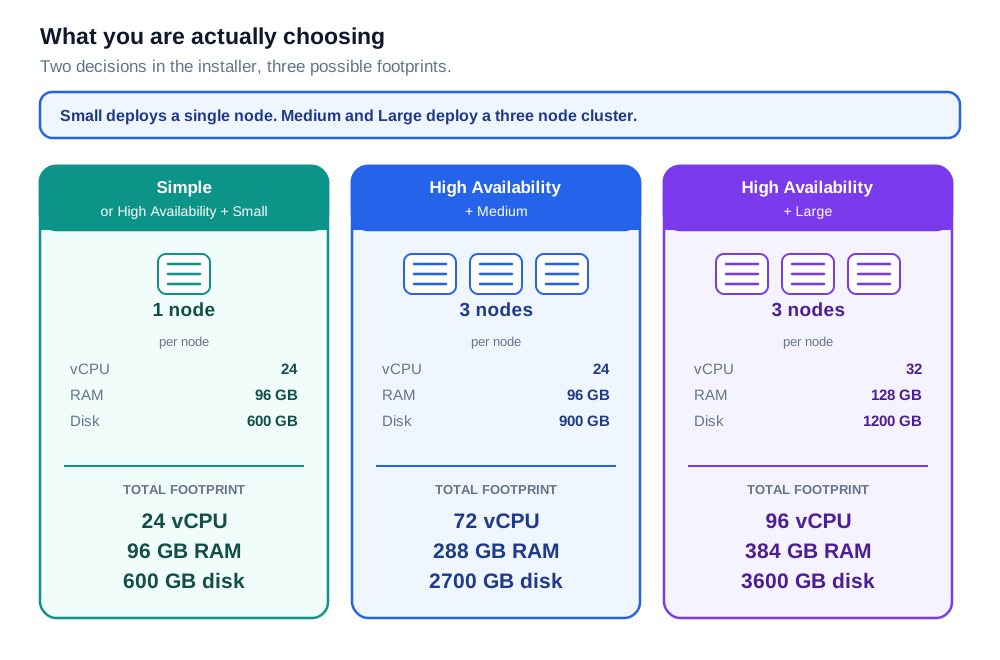
Small deploys one VCF Automation node. Medium and Large deploy three.
Three nodes is what makes it a cluster. That is the whole point of choosing them: the platform can lose a node and carry on serving. If you select High Availability and leave the size on Small, the workbook still sizes a single node, so it is really the size dropdown that determines how many nodes you get.
The per-appliance numbers
These are per appliance, which is the detail worth holding on to. The workbook states it in its own guidance: appliance sizes are listed per appliance, and the totals are calculated separately.
| Size | vCPU | RAM | Disk |
|---|---|---|---|
| Small | 24 | 96 GB | 600 GB |
| Medium | 24 | 96 GB | 900 GB |
| Large | 32 | 128 GB | 1200 GB |
Small and Medium use the same appliance specification, 24 vCPU and 96 GB, with Medium carrying an extra 300 GB of disk. Large is a genuinely bigger appliance at 32 vCPU and 128 GB.
Where the difference comes from
The size you choose changes the appliance a little, and the number of appliances a lot.
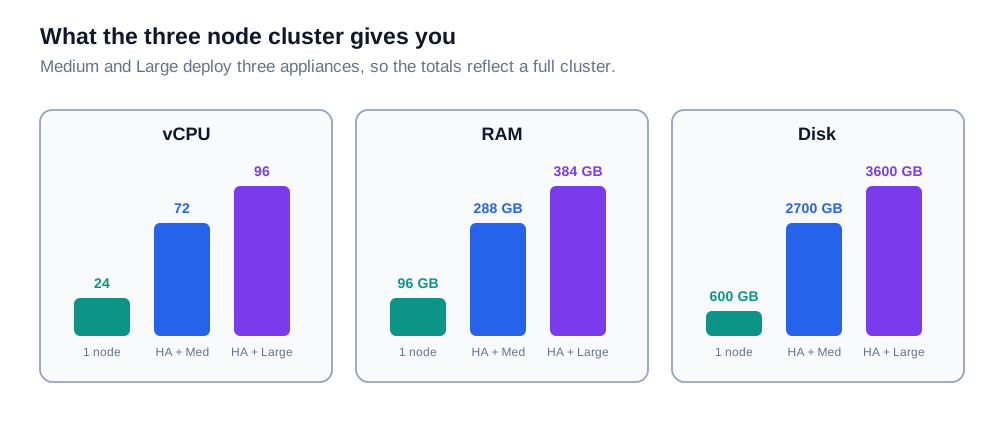
Choose Medium and you get three of those 24 vCPU appliances instead of one, so the totals come to 72 vCPU, 288 GB of memory and 2700 GB of disk. Choose Large and you get three of the bigger appliances, 96 vCPU and 384 GB in total.
That is not overhead, it is the cluster. The additional capacity is what buys you a VCF Automation that keeps running when a node goes away, which is exactly why Medium and Large exist.
Putting it together
| You choose | Nodes | Total vCPU | Total RAM | Total disk |
|---|---|---|---|---|
| Simple | 1 | 24 | 96 GB | 600 GB |
| High Availability + Small | 1 | 24 | 96 GB | 600 GB |
| High Availability + Medium | 3 | 72 | 288 GB | 2700 GB |
| High Availability + Large | 3 | 96 | 384 GB | 3600 GB |
The first two rows produce the same deployment, a single node. The three-node cluster starts at Medium.
If you choose Simple, the size decision disappears
Worth knowing before you go looking for it. Choose Simple and the size list collapses to Small only. The workbook drives the size dropdown from the availability model, and Simple offers a list with exactly one entry on it.
So there are three outcomes to plan for, not six.
What changed since 9.0
The CPU and memory figures are unchanged between the 9.0 and 9.1 workbooks. Small and Medium were already 24 vCPU and 96 GB, and Large was already 32 and 128.
The disk figures were revised:
| Size | 9.0 disk | 9.1 disk |
|---|---|---|
| Small | 455 GB | 600 GB |
| Medium | 334 GB | 900 GB |
| Large | 430 GB | 1200 GB |
If you sized an environment from the 9.0 workbook, it is worth re-checking the storage against the current figures, which scale up cleanly with the appliance size.
One practical note. The 9.1 and 9.1.1 workbooks are the same file, byte for byte, so the sizing figures are identical across both releases.
Choosing a size
- For a lab or a proof of concept, Simple is a clean fit. One node, 24 vCPU, 96 GB and 600 GB of disk.
- For anything that needs to stay up, Medium is the entry point, because that is where the three-node cluster begins. Plan for 72 vCPU, 288 GB of memory and 2700 GB of disk in the management domain.
- Choose Large when you need the bigger appliance, not more nodes. Medium and Large both give you three, so what Large adds is 8 more vCPU and 32 more GB on each one.
- Size the management domain for the option you intend to run, since the difference between one node and three is the difference between a single appliance and a cluster.
The planning workbooks
The figures above come from the Static Reference Tables and Management Domain Sizing sheets of the planning and preparation workbooks:
Never miss a post
New guides on VMware Cloud Foundation, Aria Suite, and infrastructure automation. Follow the blog in your feed reader and new posts show up as soon as they are published.
Using a different reader? Copy the feed URL and add it there.