VCF Automation Upgrade Prechecks, Explained

A failing precheck is a strange kind of good news. The upgrade has not started, nothing is broken, and something just told you precisely what would have gone wrong.
The trouble is that it tells you in the form of an identifier like test-health-04-8x-no-memory-pressure and an exit code, usually at the least convenient moment in a change window.
So here is the framework in plain terms: what runs, what the codes mean, and the numbers worth checking a week before you book anything.
What the prechecks actually are
Before a VCF Automation upgrade or patch begins, a framework evaluates the source environment: health, storage, vCenter topology, networking, database consistency and feature compatibility. Forty three documented checks, covering fifty five check IDs, because some entries cover an 8.x and a 9.x variant of the same idea.
They run in five groups, and the group that applies to you is decided by where you are coming from.
Which prechecks run for you
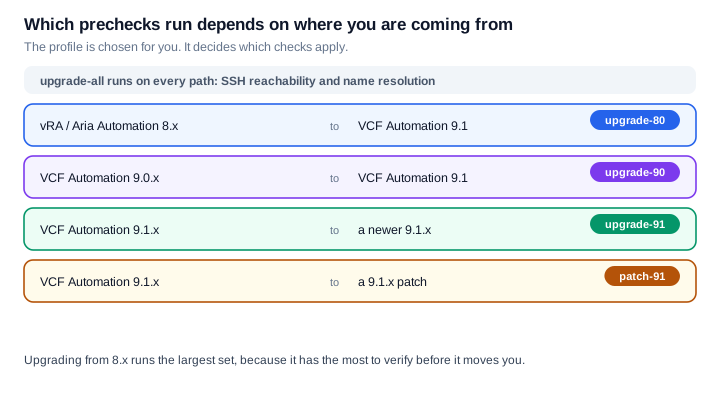
The thing worth noticing is that upgrading from 8.x runs the largest set. That makes sense, it has the most to verify before it moves you, but it means a 9.0.x to 9.1 upgrade and an 8.x to 9.1 upgrade are not comparable experiences. If your mental model of "the prechecks" came from a patch, an 8.x upgrade will feel like a different product.
Reading the result
Every check returns an exit code, and the code is the most useful thing on the screen. There are five: PASSED, FAILED, SYSTEM_ERROR, WARNING and SKIPPED.
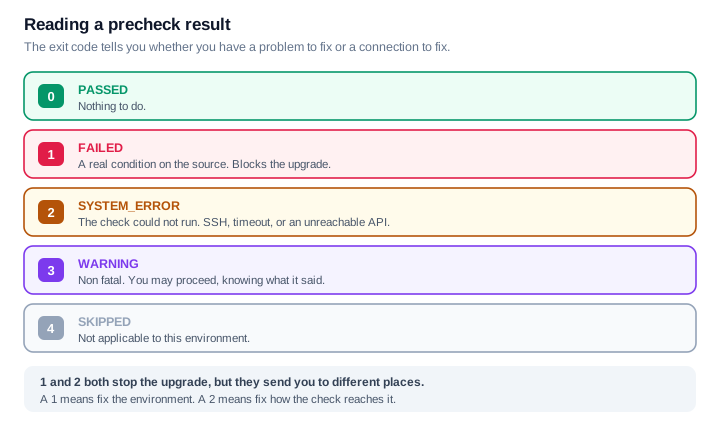
The distinction between 1 and 2 is the one to internalise. Both stop you, and they feel identical in the moment, but they send you to opposite ends of the problem.
A 1, FAILED, means the check ran fine and found something real. Go and look at the source environment.
A 2, SYSTEM_ERROR, means the check never got to run. SSH refused, a command timed out, a tool was missing, an API was unreachable. Nothing is wrong with the source yet. What is wrong is the path between the deployment appliance and the thing it is trying to inspect.
Chasing a disk problem for twenty minutes when the real issue is that port 22 is closed is an easy way to lose a change window.
Where to look when something fails
Three locations cover almost everything.
| What | Where |
|---|---|
| Aggregated summary of the run | /tmp/vcfa-upgrade/logs/precheck_runner.log |
| One specific check | /tmp/vcfa-upgrade/<check_id>.log |
| On the source node itself | /var/log/vmware/prelude/ |
The individual check log is the one people skip past. The summary tells you what failed, the check log tells you why.
The five groups, and what each one checks
SSH and basic connectivity, four checks, and they run on every upgrade path. Can the FQDN be resolved, is port 22 open, do the SSH ciphers negotiate, do the root credentials work. They run first because nothing else can run until they pass.
Source system validation and version gates, twelve checks. Is this appliance genuinely what you said it was, is it a version this path supports, is it sized for the target, and does your use of VM Apps organizations match the flags you supplied.
System health, services and database diagnostics, nine checks. Kubernetes healthy, services up, no database split brain, no memory or disk pressure, disk latency acceptable, certificate chain valid.
Application and feature compatibility, seven checks. Endpoint certificates, object store, FIPS, deprecated public cloud accounts, cloud accounts, VPC zones, load balancer resources.
Topology, network, storage and deployment spec, eleven checks. Where nodes live, which vCenter manages them, datastores, IP pools, uniqueness, free space, host readability.
Every check in all five groups is listed at the end of this post, with what it verifies and what to do when it fails.
The numbers worth knowing in advance
This is the part I would lift out and keep. Several checks are testing a specific threshold, and every one of them is something you can measure yourself long before the change window.
| Check is looking for | Threshold |
|---|---|
Disk write latency on /data | Average under 10 ms |
Free space on / and /var/log | Over 20% |
Free space on /data | Over 30% |
| Free memory | Over 5%, with swap under 80% |
| Ingress certificate validity | More than 30 days remaining |
None of these are surprising on their own. What makes them worth writing down is that each one fails an upgrade, and each one takes days rather than minutes to fix properly. A certificate with three weeks left will pass today and block you next month. A datastore that drifts past 10 ms under load will pass on a quiet afternoon and fail during a busy window.
Measure them early, and most of your prechecks are already green before you schedule anything.
Commands worth knowing
All read-only, all safe to run while you are investigating.
Appliance and cluster state:
vracli status
vracli cluster status
vracli status database
vracli certificate ingress --show
vracli disk-mgr
Kubernetes and pods on the source node:
kubectl get nodes -o wide
kubectl get pods -n prelude | grep -v Running
Space, resolution and the certificate chain:
df -h / /data /var/log
dig +short <fqdn>
openssl s_client -connect <fqdn>:443 -showcerts < /dev/null
And when you have applied a fix, you can re-run a single check rather than the whole suite:
python3 /va/vmsp/vcfa-plugin/files/scripts/precheck_runner.py \
  --precheck-dir /va/vmsp/vcfa-plugin/files/prechecks \
  --profile upgrade-80 \
  --id <check_id>
That last one is the quiet time saver. The full suite is slow, and iterating on one failing check is a much shorter loop.
Skipping a check
The framework does support skipping a non-blocking check, and exit code 4 exists partly for that reason.
I am deliberately not publishing the configuration for it. A precheck that fails is telling you something true about the environment, and the gap between "this condition is acceptable here" and "this condition is inconvenient right now" is not one a copied snippet can judge. If you believe a check does not apply to your situation, that is a conversation to have with Broadcom Technical Support, who can look at the actual condition with you.
The short version
Know which profile applies to you, because an 8.x upgrade and a 9.1 patch are not the same experience. Read the exit code before you read anything else, because 1 and 2 send you in opposite directions. And measure the five thresholds above a week early, because those are the failures that cost you a window rather than a few minutes.
The full catalogue
All forty three checks, grouped the way the framework groups them. The wide tables scroll sideways on a phone.
SSH and Basic Connectivity
4 checks, under upgrade-all.
| Check | What it verifies | If it fails |
|---|---|---|
test-ssh-01-fqdn-resolvable | Resolves the FQDN of the source system's Primary node via DNS using nslookup or dig. Ensures the deployment engine can map the FQDN to a valid IPv4 address. | Add forward and reverse A/PTR records for the primary node in the environment DNS server, or update /etc/hosts on the deployment appliance. |
test-ssh-02-ip-port-open | Tests TCP port 22 accessibility on the source primary VIP/IP using nc -z -w 5 <ip> 22 or curl -v telnet://<ip>:22. | Open TCP port 22 on perimeter firewalls between the deployment appliance and source nodes. |
test-ssh-03-cipher-negotiation | Initiates an SSH handshake to verify supported Ciphers, KEX algorithms, and MACs between source and target appliances (ssh -vvv -o BatchMode=yes). | Update /etc/ssh/sshd_config on the source node to include standard secure ciphers (e.g. aes256-gcm@openssh.com, chacha20-poly1305@openssh.com),... |
test-ssh-04-authentication | Validates root SSH credentials or private key by executing a remote command (ssh root@<source-ip> "hostname"). | Ensure PermitRootLogin yes is set in /etc/ssh/sshd_config. Verify root password is valid and not expired (passwd -S root). |
Source System Validation and Version Gates
12 checks, under upgrade-80, upgrade-90.
| Check | What it verifies | If it fails |
|---|---|---|
test-source-01-8x-product-identification | Queries vracli version or reads /etc/issue / /opt/vmware/etc/vami/version to verify the source appliance is genuinely vRealize Automation / Aria Automation... | Verify that the correct target source system IP/FQDN was specified in the upgrade deployment specification. |
test-source-01-9x-product-identification | Inspects Kubernetes CRDs or PackageDeployment resource labels (kubectl -n prelude get pd) to confirm the source system is VCFA 9.0.x. | Confirm the source deployment is VCFA 9.0.x before applying the upgrade-90 profile. |
test-source-02-8x-version-validation | Checks that source vRA 8.x version is 8.18.0 or higher. VCFA 9.1 does not support direct upgrades from vRA versions prior to 8.18.0. | Upgrade the source vRA 8.x cluster to Aria Automation 8.18.0 or 8.18.1 first using Aria Suite Lifecycle before attempting upgrade to VCFA 9.1. |
test-source-02-9x-version-validation | Validates that source VCFA version is 9.0.0 or 9.0.1. | Ensure source cluster is patched to a supported VCFA 9.0 release before running upgrade. |
test-source-03-9x-classic-mode-target-size | Evaluates source deployment sizing against target profile. Verifies whether a Small source deployment can target the requested destination deployment size. | Adjust the target size in the upgrade spec (spec.upgrade.deploymentSize) to match supported sizing matrix. |
test-source-03-memory-cpu-config | Inspects source node vCPU and RAM allocations against VMware standard appliance specs (Standard vs Compact profiles). | Power off source VMs and adjust vCPU/RAM allocation in vCenter to match official sizing guidelines. |
test-source-04-custom-profiles | Checks if custom Helm/Kubernetes resource profile overrides have been manually applied to service deployments. | Document custom resource overrides; reset deployments to standard profiles if instability occurs post-upgrade. |
test-source-04-9x-vm-apps-orgs-without-flag | Checks for organizations utilizing VM Apps features where the underlying feature flag is disabled. | Enable the required feature flag or clean up orphaned VM App org configurations. |
test-source-05-8x-classic-mode-target-size | Checks VM Apps usage on vRA 8.x and ensures target VCFA 9.1 sizing accounts for VM Apps workloads. | Select Medium or Large target deployment size in the upgrade spec. |
test-source-05-9x-vm-apps-flag-without-orgs | Detects if VM Apps feature flag is enabled globally but no organizations are using it. | Disable unused feature flag prior to upgrade. |
test-source-05-vcf-services-runtime-version-supported | Verifies VCF Services runtime version compatibility with VCFA 9.1. | Update VCF Services runtime components to supported release. |
test-source-06-9x-vm-apps-flag-with-orgs | Validates that VM Apps in active use on Small source node meet resource constraints. | Upgrade cluster resource allocation or target Medium size. |
System Health, Services and Database Diagnostics
9 checks, under upgrade-80, upgrade-90.
| Check | What it verifies | If it fails |
|---|---|---|
test-health-01-8x-k8s-healthy | Runs kubectl get nodes -o json on source vRA 8.x. Verifies all nodes are in Ready status and runs vracli status first-boot across all nodes. | Restart kubelet (systemctl restart kubelet) or reboot affected vRA nodes. Resolve disk or memory pressure on NotReady nodes. |
test-health-01-9x-k8s-healthy | Checks kubectl get nodes and queries synthetic check endpoint curl -ks https://<ip>:30006/status. | Investigate failing synthetic check pods and restore k8s node readiness. |
test-health-02-8x-services-healthytest-health-02-9x-services-healthy | Queries curl -s http://<vra_ip>:8008/api/v1/services/cluster. Verifies all core microservices (abx-service-app, approval-service-app, blueprint-service-app,... | Restart failing pods (kubectl delete pod <pod-name> -n prelude). If persistent, check pod logs (kubectl logs -n prelude <pod-name>). |
test-health-03-8x-no-db-split-braintest-health-03-9x-no-db-split-brain | Executes repmgr cluster show inside the postgres-0 pod in prelude namespace. Counts active primary database nodes. | If split-brain occurs, run vracli database cluster repair or manual repmgr node rejoin. Ensure repmgr standby nodes follow the designated primary. |
test-health-04-8x-no-memory-pressure | Checks RAM and swap usage on each cluster node via free -m. Flags MemoryPressure if free memory is < 5% or swap usage exceeds 80%. | Stop non-essential workloads or restart memory-heavy pods. Increase RAM in vCenter if appliance is under-provisioned. |
test-health-04-9x-disk-io-latencytest-health-06-8x-disk-io-latency | Deploys a temporary benchmark pod or runs ioping on /data directory to test disk write latency. Latency must be < 10ms average for database write safety. | Migrate vRA storage to higher performance datastores (NVMe/SSD/vSAN). Avoid running heavy vSphere storage vMotions during upgrade. |
test-health-05-8x-no-disk-pressure | Executes df -h on source nodes. Verifies free space on root / (>20%), /var/log (>20%), and /data (>30%). | Clean old logs (journalctl --vacuum-time=2d), delete old support bundles in /var/log/vmware/, or expand appliance disk in vCenter via `vracli... |
test-health-07-8x-cert-chain-validtest-health-07-9x-cert-chain-valid | Inspects ingress TLS certificate using openssl x509. Verifies certificate expiry date (>30 days remaining), valid CA chain, and SAN matching FQDN. | Replace expired or invalid certificates using vracli certificate ingress --set prior to upgrade. |
test-health-08-8x-vidm-basic-connectivity | Executes vra8x-vidm-basic-connectivity.py on source. | Verify vIDM appliance is powered on and healthy. Fix network routing and DNS resolution between vRA and vIDM. |
Application and Feature Compatibility
7 checks, under upgrade-80, upgrade-90, patch-91.
| Check | What it verifies | If it fails |
|---|---|---|
test-application-01-8x-endpoint-certificates | Scans all registered cloud endpoints (vCenter, NSX, Orchestrator) for expired or untrusted SSL certificates. | Re-accept or update untrusted endpoint certificates in vRA Cloud Accounts UI. |
test-application-01-91x-native-object-store | Inspects vsan-service-vmsp-backend deployment and ccs-vsan-eas-proxy service in prelude namespace to verify Native Object Store readiness. | Re-apply native object store manifests or restart ccs-k3s-app pod. |
test-application-01-9x-fipstest-application-02-8x-fips | Checks FIPS mode configuration (vracli security fips or vaconfigs.prelude.vmware.com). | Reconfigure non-compliant endpoints or update encryption ciphers on remote hosts. |
test-application-02-9x-public-cloud-deprecationtest-application-06-8x-public-cloud-deprecation | Scans registered cloud accounts for deprecated public cloud adapters (AWS, Azure, GCP). | Review public cloud workloads; acknowledge warning before proceeding. |
test-application-03-8x-cloud-accounts | Validates health and credential status of vSphere and NSX Cloud Accounts via vra8x-cloud-accounts-check.sh. | Update expired credentials for vCenter/NSX cloud accounts in Infrastructure settings. |
test-application-04-8x-vpc-zones | Evaluates VPC cloud zones configuration for migration compatibility to VCFA 9.1 networking structures. | Re-align VPC cloud zone subnet definitions with standard fabric networks. |
test-application-05-8x-avi-lb-resources | Inspects NSX Advanced Load Balancer (AVI) integrations and resource objects using vra8x-avi-lb-resources-check.sh. | Restore connectivity to AVI Controller and verify API credentials. |
Topology, Network, Storage and Deployment Spec
11 checks, under upgrade-80, upgrade-90.
| Check | What it verifies | If it fails |
|---|---|---|
test-topology-01-primary-ip-on-mgmt-vcenter | Uses govc API calls to verify that the source Primary VM resides on the designated management vCenter server. | Correct vCenter credentials or target cluster details in the deployment spec. |
test-topology-02-all-nodes-on-mgmt-vcenter | Verifies all nodes of a multi-node vRA/VCFA cluster reside on the same management vCenter inventory. | Migrate all cluster member VMs to the management vCenter inventory. |
test-topology-03a-import-spec-validationtest-topology-03b-upgrade-spec-validation | Validates JSON schema syntax, required fields, and structural integrity of the upgrade specification. | Fix JSON formatting errors or supply missing fields in the spec file. |
test-topology-04a-vm-single-datastoretest-topology-04b-source-target-same-datastore | Verifies that each source VM's virtual disks reside on a single datastore, and validates target datastore compatibility. | Perform storage vMotion in vCenter to consolidate VM disks onto a single datastore. |
test-topology-05a-platform-fqdn-resolvable-locally05b-vcfa-fqdn-resolvable05c-vcfa-fqdn-resolvable-locally | Performs bi-directional DNS checks: verifies target VCFA FQDN resolves locally from deployment node AND from source vRA nodes. | Register target VCFA FQDN in corporate DNS servers accessible by all management subnets. |
test-topology-06a-source-ips-in-target-network06b-ip-pool-in-target-network06c-platform-vips-in-target-network | Subnet boundary validation. Verifies source IPs, new IP address pools, and VIPs belong to the target vSphere portgroup network subnet. | Update IP pool or VIP definitions in the upgrade spec to match target subnet. |
test-topology-07a-ip-pool-size-validationtest-topology-07b-ip-uniqueness-validation | Validates that the provided IP pool has enough free IP addresses (minimum required for deployment size) and contains no duplicate IP entries. | Expand IP pool size or remove duplicate IP entries. |
test-topology-08a-node-pool-ips-availabletest-topology-08b-platform-vip-available | Executes check-target-ips-available.sh. Sends ARP and ICMP pings to all target node IPs and VIPs to verify they are NOT currently in use on the network. | Reassign unused IP addresses in the deployment spec or decommission conflicting stale VMs. |
test-topology-09a-cluster-hosts-readabletest-topology-09b-cluster-hosts-cpu-threads | Queries vCenter host inventory via govc host.info. Verifies read permissions and checks host CPU core/thread capacity against the requested deployment size. | Ensure service account has vCenter Read-Only/Admin privileges across cluster; select an ESXi cluster meeting CPU thread minimums. |
test-topology-10a-all-hosts-have-target-datastore10b-9x-target-datastore-free-space10c-8x-target-datastore-free-space | Verifies all ESXi hosts in the target cluster mount the specified datastore, and calculates the required datastore free space from the base size and the source /data/db/live size. | Mount target datastore to all ESXi hosts in the cluster. Free up space on datastore or expand datastore capacity in SAN/vSAN. |
test-topology-11a-all-components-datastore-passthroughtest-topology-12a-zones-placement-supported | Validates multi-zone vSphere placement parameters and Fleet LCM component datastore passthrough options. | Configure explicit zone definitions or datastore Managed Object IDs in deployment spec. |
Never miss a post
New guides on VMware Cloud Foundation, Aria Suite, and infrastructure automation. Follow the blog in your feed reader and new posts show up as soon as they are published.
Using a different reader? Copy the feed URL and add it there.