What Is New and What Is Fixed in VCF 9.1.2

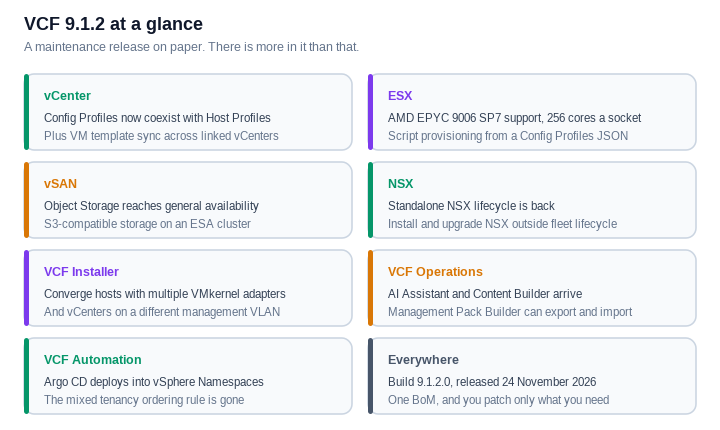
VCF 9.1.2 shipped on 24 November 2026, build 9.1.2.0 across the stack, with a refreshed Bill of Materials.
The release notes describe a maintenance release, limited in scope to keep the operational impact small, with features mostly aimed at supportability. That is a fair description of most of it. It also undersells two items, because vSAN Object Storage reaching general availability and NSX getting its standalone lifecycle back are not small.
At a glance
Patch in this order
This sits near the bottom of the main release notes page, under "Getting to 9.1.2", after the feature list. It is the part that decides whether your patch night is quiet.
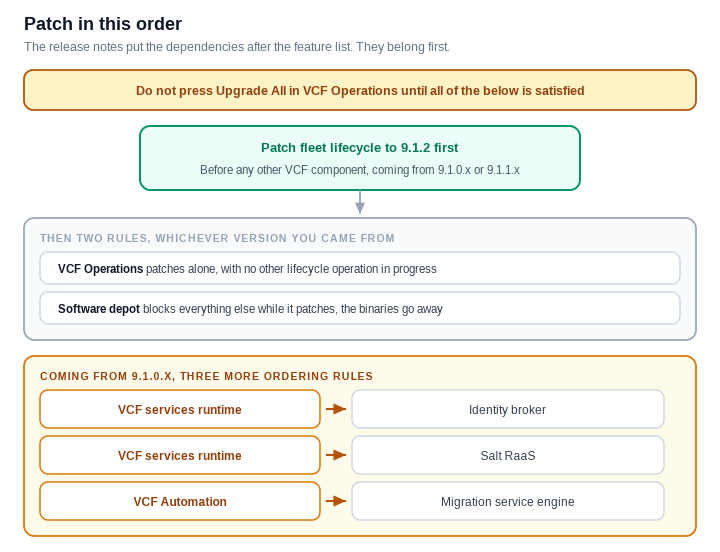
Fleet lifecycle goes first. Whether you are on 9.1.0.x or 9.1.1.x, you patch the VCF management services fleet lifecycle component to 9.1.2 before any other VCF component.
Then two rules apply either way. Do not patch VCF Operations in parallel with anything else, and make sure no other lifecycle operation is running when you start it. And while a software depot instance is patching, other components are blocked, because the patch binaries are unavailable until it finishes.
Coming from 9.1.0.x, three more. Patch the VCF services runtime before the identity broker instance it hosts, patch the services runtime before Salt RaaS, and patch VCF Automation before the migration service engine.
The release notes say this plainly for both source versions, in capitals: do not use the Upgrade All button in the VCF Operations UI until you have complied with all of it.
vCenter
New
- Configuration Profiles and Host Profiles can coexist. Enabling Configuration Profiles on an existing cluster no longer detaches Host Profiles already attached to the cluster or its hosts, so you can evaluate one while the other stays in place.
- Configuration Profiles cover more. They now manage the SSH, ESX Shell and DCUI services, and host-wide virtual machine defaults in
/etc/vmware/config, with compliance checking and drift remediation. - You can pause automatic compliance operations per cluster, which cuts vCenter CPU, memory and database I/O, and lets you run checks in a maintenance window instead of fielding drift alarms during one.
- Cluster remediation no longer deadlocks on a false positive. There is an All pre-check results tab grouping results by cluster checks, cluster solutions and hosts, with an option to ignore health check issues and proceed.
- VM template synchronisation across linked vCenters. Content Library can sync templates across vCenter instances linked through vCenter groups in VCF Operations, with no Enhanced Linked Mode and no manual replication.
- Content Library transfers size their own timeouts. NFC timeouts are calculated from payload size and throughput rather than a fixed 20 minutes, which is what used to kill large template and ISO transfers on slow links.
Fixed, and worth knowing
- SMTP credentials were visible to everyone in the vSphere Client and through the OptionManager API.
- Encrypted file-based backup metadata carried no integrity protection, and backup transfers to external FTPS, HTTPS or SFTP servers ran without authenticating the target server identity.
- Concurrent content library syncs could insert a duplicate row in the vCenter database, after which every later sync on that library failed.
- Storage performance charts showed raw counter keys instead of metric names.
- After a vCenter upgrade, the SNMP agent came back enabled by default.
Security: CVE-2026-123906, CVE-2026-123907, CVE-2026-123908 and CVE-2026-123909, covered by VMSA-2026-0011.
ESX
New
- AMD 6th Generation EPYC 9006 SP7 support, codename Venice, scaling to 256 cores per socket and 512 threads.
- Script provisioning from a Configuration Profiles JSON. You can hand a cluster's desired configuration file to a scripted install instead of writing a long list of kickstart commands.
- Hardware-timestamped PTP over SR-IOV on Broadcom BCM57504 adapters.
Fixed, and worth knowing
Twenty six issues, and seven of them end on a purple diagnostic screen: removing NVMe namespaces on the target array, slab allocator corruption, mounting a tardisk with a truncated header, a race in the USB network adapter in management controllers, a race on disks with an attached I/O filter, misconfigured NPIV, and a #PF Exception 14 while processing a TCP timer.
Elsewhere: a host unexpectedly rebooting when a virtual machine with a Marvell QLogic Fibre Channel HBA powers on, hosts intermittently disjoining from Active Directory because of a memory leak, AD user and group permissions being removed unexpectedly, QuickBoot failing to allocate memory on platforms with several terabytes of DRAM, and NVMe over FC and SCSI over FC paths not restoring after a storage controller restart. New Intel and AMD microcode ships with the patch.
Count the fixes off the page yourself and you will get seventy eight. The same list is published three times, once for each image profile: the base one, -standard and -no-tools.
vSAN
New
- vSAN Object Storage is generally available. S3-compatible object storage on a vSAN ESA cluster, integrated with VCF, so S3 workloads can use the storage you already have rather than a separate system.
- Reclaimable block volumes and out-of-band snapshots. vSphere CSI now tracks orphaned volumes and snapshots, with end-to-end volume lineage, cleanup from the UI, proactive vSAN alerts and a multi-level snapshot view.
Worth reading before you deploy it
Every known issue on the vSAN page is about Object Storage, which is what a first general availability looks like. Two to note. If you use Avi Load Balancer and want to deploy Object Storage, the documentation says to contact Broadcom Support. And VCF Automation reports zero bytes of storage used by object stores, because the service does not report provisioned capacity to the Supervisor, so an organization's storage accounting reads lower than what is actually provisioned.
NSX
New
- Standalone NSX lifecycle is back. You can manage NSX independently of VCF fleet lifecycle again: install it without the full-stack VCF installer, upgrade an existing deployment to 9.1.2 without the converge process, and use NSX Manager for monitoring, certificates, passwords and authentication. This also supports the NSX platform for vDefend virtual patching.
- NSX entitlement in VVF. Deploy NSX and vDefend directly in a vSphere Foundation environment.
- Static IP and MAC for host TEPs in a transport node profile, without ARP conflicts or false override detection in vSphere Configuration Profiles.
- Avi Service Engine data network customisation. Configure a dedicated subnet CIDR for Avi Service Engines through the NCPSetting CRD, which gets you past the old /28 ceiling.
- ODS runbooks in the NSX Manager UI, with live execution progress, output artifacts, and KB article recommendations against mapped alarms.
Fixed, and worth knowing
Thirty issues, the longest fix list in the release. The ones most likely to have cost someone a weekend: only one of two tier-0 uplinks being used for ECMP southbound to northbound traffic, Edge dataplane crashes when an interface did not come up after a config flip, MP2P migration failing because an IP address block had no spare capacity, OpenLDAP authentication breaking after an upgrade from pre-9.1, and NSX Manager upgrades from 9.1.0 or 9.1.1 failing early at the management plane step.
Thirty rather than the thirty three entries you will count, because the MP2P capacity failure is written up twice in nearly identical wording, and two of the entries are UI paths sitting inside another issue rather than issues of their own. One fix is published with no title at all, opening straight into its symptoms: Edge CLI commands such as get route hanging on edges that have dynamic BGP neighbours configured.
One to be aware of on the other side of the ledger: a critical heap buffer overflow in nginx, triggerable through a crafted HTTP request, is listed under known issues rather than resolved.
VCF Installer and SDDC Manager
New
- Converge and import hosts with multiple VMkernel adapters. Hosts with several vMotion and management VMkernel adapters, IPv4 and IPv6 both, as long as each host has at least one management and one vMotion adapter.
- Converge and import vCenter instances on a different management VLAN from the VCF management VLAN, connected to a distributed virtual port group on that VLAN.
Security: CVE-2026-111497, covered by VMSA-2026-0008.
There is also a trust store change here that deserves its own section further down.
VCF Operations
Most of this release landed here.
Lifecycle
- One log bundle per lifecycle task. For a lifecycle task of VCF management services or VCF Automation, you can generate and download a bundle containing the task logs plus the full logs of every component that took part in it.
Operate
- VCF Diagnostics gains three things. HA Forensics, a correlated drill-down timeline of vSphere HA events so you can see what happened during an incident and why. Reduced Downtime Upgrade diagnostics for vCenter, with live progress and an accurate downtime measurement. And Supervisor support bundles collected and uploaded through Log Assist straight to your support case.
- Service and process monitoring at scale. Windows services and Linux processes across the estate using Telegraf agents, defined once in Monitoring Templates and deployed to groups of virtual machines.
- Quieter maintenance. Alerts and symptoms can be suppressed during vCenter maintenance, and maintenance mode behaviour is customisable.
- Cost and capacity. Additional cost configuration for VKS control plane and worker nodes, and a cool-down period so a rightsized VM is left alone for a while before the next recommendation appears.
Manage
- Integrated Windows Authentication with Active Directory over LDAP for VCF single sign-on.
- Faster background collection. Password metadata now every hour instead of every six, certificate details every 30 minutes instead of every six hours.
- Custom Salt content. VMware Salt for VCF extends to external Salt minions running your own Salt content.
Extensions
- VCF AI Assistant and Content Builder. Natural-language troubleshooting of ESX and vCenter issues against established support runbooks, vMotion root cause analysis, security advisory assessments, conversational access to inventory, alerts and metrics, and persistent conversations with access and usage controls. An Agentic Control Center handles centralised model management.
Management Pack Builder
- Export and import. A design can be exported as an installable
.pakfile and imported elsewhere, carrying dashboards, alerts and log queries with it. - JQ response parsing, for reshaping API responses in formats that are not natively supported.
VCF services runtime
- eMudhra root CAs are out of the trust bundle.
- SSH root login is disabled on services runtime virtual machines.
- You can block external access to port 6443, which serves the Kubernetes API, so compliance scans pass. Access stays enabled by default, so this is something you turn on.
- vCenter configuration drift detection for the runtime's own virtual machines, with alerting or remediation.
Orchestrator
- Integrated load balancing, Python type hints in polyglot, and centralised polyglot repository management.
HCX
- DVPG to DVPG network extension no longer requires NSX-ready vSphere clusters, the functional limitations in evaluation mode are gone, and there is alternate licensing.
VCF Automation
New
- Argo CD deploys into vSphere Namespaces through the GitOps Service, and you sign in to the deployed instance with VCF Automation credentials to manage workloads in vSphere Namespaces and VKS clusters. 9.1.2 bundles Argo CD service 1.2, and you can move to 1.3 through Service Management in the Provider Management UI.
- One thing to plan around: Argo CD service support for a new Kubernetes minor version runs two to four months behind VKS. On current schedules a June VKr picks up Argo CD support in October, an October VKr in January, and a February VKr in April.
Fixed, and worth knowing
- The mixed tenancy ordering rule is gone. More on that below.
- Property group string constants longer than 1,024 characters were silently truncated before being sent to the API, even though the backend has no maximum length.
- Changing a blueprint's icon or name broke the connection to its custom form, so the form stayed in the database but would not load.
- Pod details did not display in the organization portal.
- VCF Operations orchestrator logs filled the disk on appliances upgraded from Aria Automation 8.18.x.
- Importing OVAs or VM templates stopped before all files finished, and large blueprint exports failed or never completed.
Two to read twice
A certificate that worked yesterday can be rejected after you patch
SDDC Manager drops the eMudhra (emSign) root CAs and the Sectigo AAA Certificate Services root from its trust stores. The reason is that the private keys of several eMudhra intermediate authorities use weak encryption and are vulnerable to recovery, and those intermediates are cross-signed by the Sectigo AAA root. The removal covers both the Java trust store SDDC Manager uses and the Photon OS trust list behind the appliance's command-line tools, and Node.js in Photon OS moves to 24.19.0-5, which rejects TLS chains through the affected certificates. The VCF services runtime trust bundle loses the same roots.
What this means in practice. A certificate installed on vCenter, NSX or ESX through SDDC Manager keeps working, because its chain is already in the trust store. A certificate installed directly on a component outside SDDC Manager, or on something you configured yourself such as a proxy, is the one to check before you patch rather than after.
Mixed tenancy no longer cares which organization came first
In 9.1 you could share a vCenter instance between All Apps and VM Apps organizations, but only if the vCenter had been configured for VM Apps first. Configure it for All Apps first and the VM Apps side was closed to you.
From 9.1.2 you can run operations on both VM Apps cloud accounts and All Apps organizations irrespective of the order they were created in. If you have a design document with "create the VM Apps organization first" written into it, that line is now a 9.1.0 and 9.1.1 note rather than a standing rule.
Sources
- VMware Cloud Foundation 9.1.2.0 Release Notes
- Bill of Materials 9.1.2
- vCenter 9.1.2.0 Release Notes
- ESX 9.1.2.0 Release Notes
- vSAN 9.1.2.0 Release Notes
- NSX 9.1.2.0 Release Notes
- VCF Installer and SDDC Manager 9.1.2.0 Release Notes
- VCF Operations 9.1.2.0 Release Notes
- VCF Automation 9.1.2.0 Release Notes
Never miss a post
New guides on VMware Cloud Foundation, Aria Suite, and infrastructure automation. Follow the blog in your feed reader and new posts show up as soon as they are published.
Using a different reader? Copy the feed URL and add it there.