Where Do My IPs Go? Aria Automation 8.x to VCF Automation 9.1.x

One of the first questions that comes up when planning an upgrade from VMware Aria Automation 8.18.x to VCF Automation 9.1.x is a simple one: how many IP addresses do I need, and what happens to the ones I already have?
The upgrade does not reuse your existing node IPs for the new nodes. It asks for a completely new range, builds a new cluster on it, and then brings your old node IPs back in a different role.
Why the IP requirements change
Aria Automation 8.18.x is a traditional three-node virtual appliance cluster. Three appliances, three static IPs, an external load balancer in front. The appliances are long lived and their identity stays with them.
VCF Automation 9.1.x runs as a desired-state platform on top of the VCF Services Runtime. It expects to stand up a node, drain one, or replace one as part of normal lifecycle operations, and it needs address space to do that without asking you for more IPs every time.
That is why it wants its own contiguous range with spare capacity in it, rather than three addresses you picked by hand.
What you have to supply
VCF Services Runtime CIDR or IP range. A block of at least 5 IPs. Three go to the new cluster nodes, two are held back as buffer so a future upgrade can bring up a replacement node before retiring an old one. In this example, 10.10.100.25 to 10.10.100.29. You can also give a /29 CIDR block.
VCF Services Runtime FQDN. A unique FQDN whose IP sits outside the runtime range, 10.10.100.24 here.
Both must be on the same network as your existing Aria Automation nodes. An upgrade is not a re-IP exercise.
IP allocation, before and after
| Role | Aria Automation 8.18.x | VCF Automation 9.1.x |
|---|---|---|
| External load balancer | 10.10.100.14 | 10.10.100.14, unchanged |
10.10.100.15 | Appliance node 1 | Cluster VIP |
10.10.100.16 | Appliance node 2 | Cluster VIP |
10.10.100.17 | Appliance node 3 | Cluster VIP |
10.10.100.24 | n/a | VCF Services Runtime FQDN |
10.10.100.25 | n/a | VCF Automation Node-1 |
10.10.100.26 | n/a | VCF Automation Node-2 |
10.10.100.27 | n/a | VCF Automation Node-3 |
10.10.100.28 | n/a | Buffer |
10.10.100.29 | n/a | Buffer |
You need six new addresses: five for the VCF Automation 9.1.x nodes, one for the VCF Automation Services Runtime FQDN. Everything you already had stays in play.
The transition
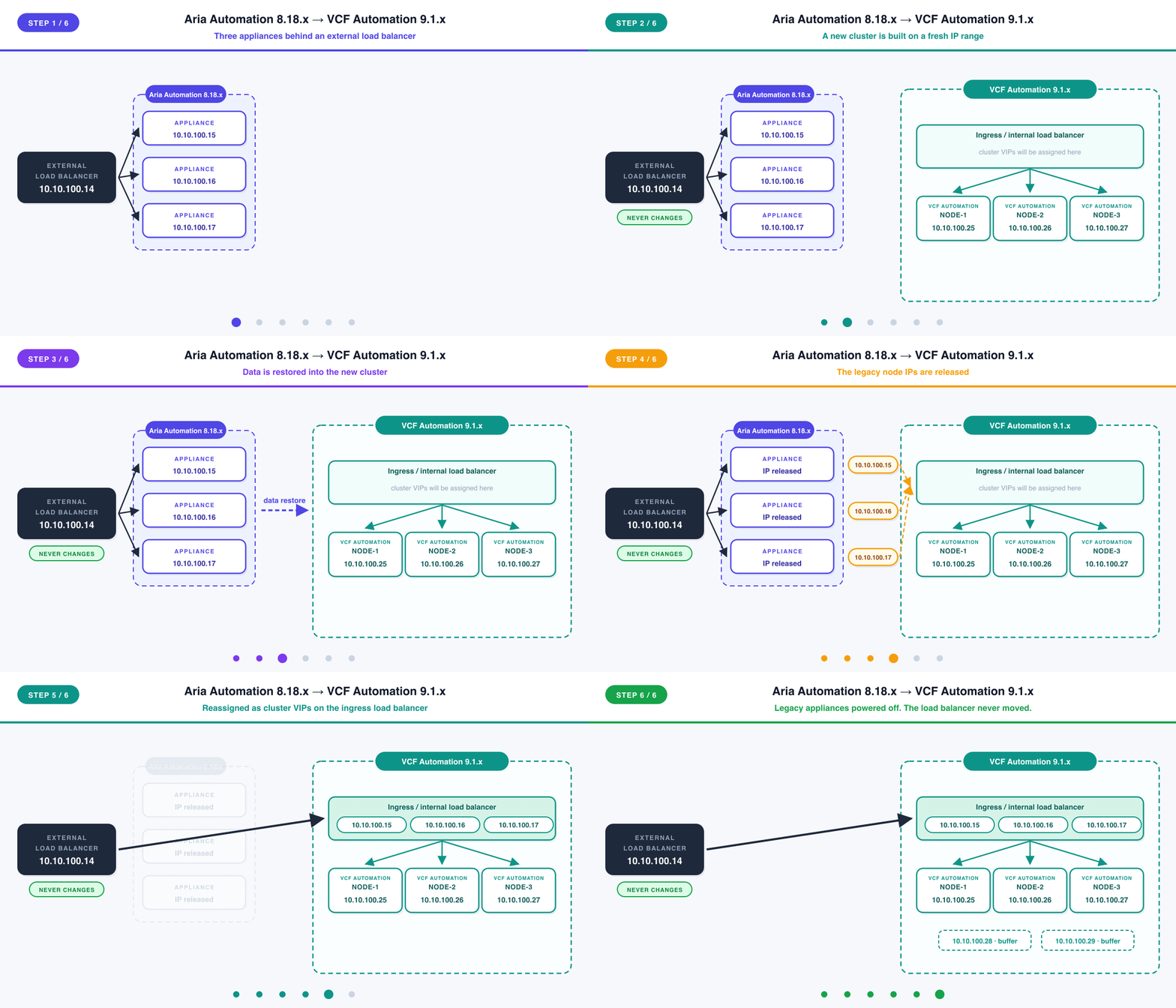
- A new cluster is built on
10.10.100.25to.27, alongside the running 8.18.x appliances. A temporary bootstrap VM also takes an address from the range, and is destroyed later. - Data is restored from the source cluster into the new one.
- The legacy node IPs are released from the 8.18.x appliances.
- They are reassigned as cluster VIPs.
10.10.100.15,.16and.17are assigned to the ingress, or internal, load balancer of the new 9.1.x cluster. They are no longer node addresses. The ingress load balancer answers on them and distributes across all three new nodes. - The external load balancer carries on unchanged. It still has
.15,.16and.17as its pool members, and those addresses still answer. No load balancer reconfiguration, no external DNS change, no VIP edit. - The legacy appliances are powered off.
The key idea in step 4 is that the cluster VIPs do not belong to any one node. They sit on the ingress load balancer in front of all three, which is what lets the platform replace an individual node later without the address moving.
Key takeaways
- Six new IP addresses. Five for the VCF Automation 9.1.x nodes, one for the VCF Automation Services Runtime FQDN.
- The range needs at least 5 addresses, or a
/29. Three for nodes, two for buffer. - The buffer is not padding. It is what allows a future upgrade to add a node before removing one.
- The VCF Automation Services Runtime FQDN sits outside the range given for its nodes.
- Everything stays on the same network as your existing nodes.
- Your old node IPs are promoted, not retired. They come back as cluster VIPs on the new cluster's ingress load balancer.
- The external load balancer never changes. Same VIP, same pool members, no DNS edits.
Never miss a post
New guides on VMware Cloud Foundation, Aria Suite, and infrastructure automation. Follow the blog in your feed reader and new posts show up as soon as they are published.
Using a different reader? Copy the feed URL and add it there.