FQDNs and IPs When You Upgrade VCF Automation 9.0.x to 9.1.x

I wrote up the vRA 8.x hop earlier today. This is the other one, 9.0.x to 9.1.x, and it ends in the same place for a slightly different reason.
The starting point is tidier here, because a 9.0.x cluster already keeps two sets of addresses apart. The ones your load balancer talks to, and the ones the nodes actually run on. That separation is what makes this upgrade easy to reason about.
Where you start
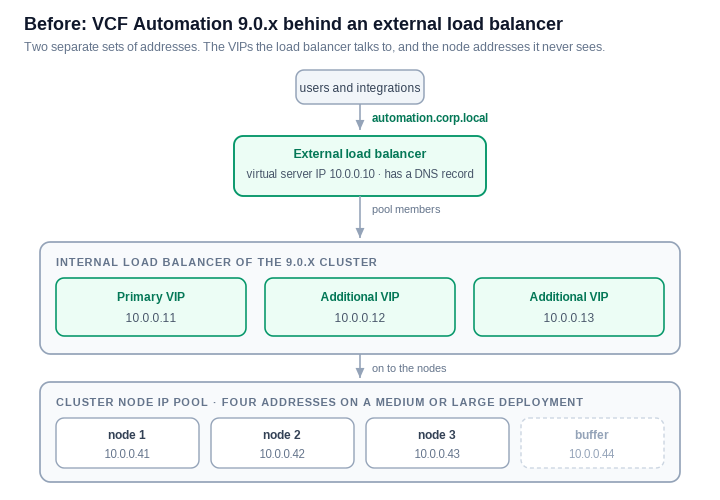
Your external load balancer has one virtual server. The VCF Automation load balancer FQDN resolves to its IP, and that record is unique and already in DNS.
Behind the virtual server sit the pool members, and on a 9.0.x cluster those are VIPs rather than nodes. One Primary VIP and two Additional VIPs, carried on the cluster's own internal load balancer.
The nodes are somewhere else entirely. Three of them, each taking an address from the Cluster Node IP Pool, with one more address in that pool held as a buffer. Your external load balancer has never seen those addresses and does not need to.
What you hand over
| Field | Where it comes from |
|---|---|
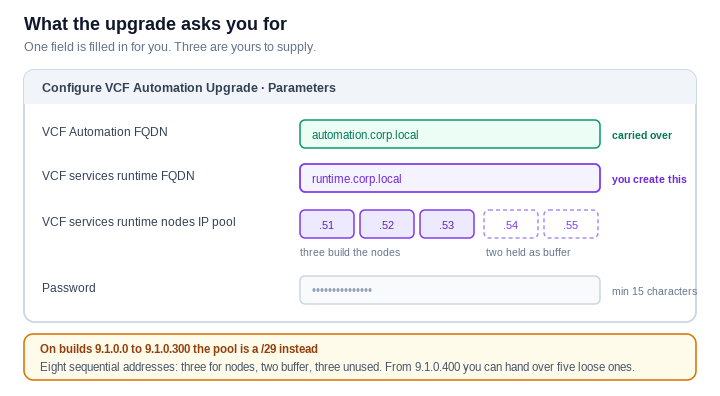
| VCF Automation FQDN | Carried over from your 9.0.x deployment, automatically |
| VCF services runtime FQDN | New. You create it, with its own IP outside the pool |
| VCF services runtime nodes IP pool | New. Five addresses: three build the nodes, two are buffer |
| Password | One password, for the vmware-system-user and admin@vsp.local accounts |
Three things worth knowing. The two buffer addresses are for automatic redeployment of a failed node and for rolling updates, so they are not spare capacity to borrow. The services runtime FQDN cannot contain capital letters. And on builds 9.1.0.0 through 9.1.0.300 the pool is not five loose addresses at all, it is a /29 block of eight sequential ones, of which three go unused. From 9.1.0.400 you can supply five, contiguous or not.
One prerequisite belongs in this list even though it is a certificate rather than an address. The Subject Alternative Name field of your VCF Automation certificate has to contain the FQDNs and IP addresses of all the Automation nodes, plus the FQDN and IP address of the load balancer VIP. Worth checking before you book the window rather than during it.
What happens in the middle
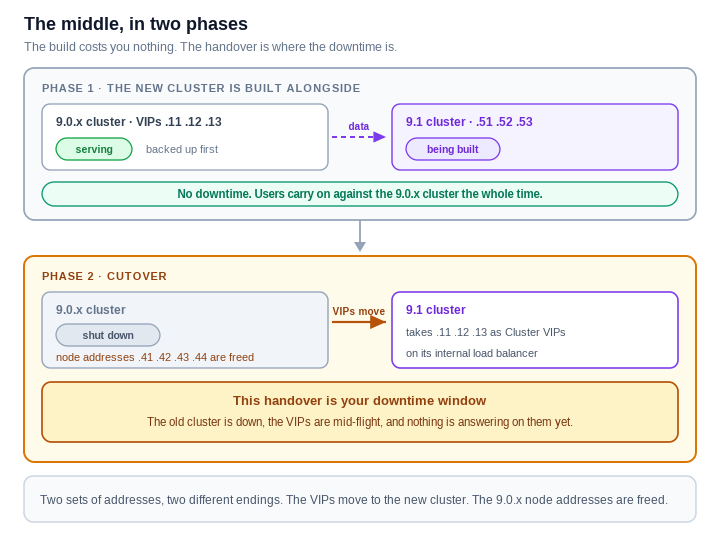
It is a blue-green upgrade, and only the second half of it costs you anything.
Phase one builds the new cluster. The source cluster is backed up, a dedicated VCF services runtime instance comes up on the five addresses you supplied, and data and configuration move across to it. Your 9.0.x cluster carries on serving the whole time, so you need headroom in the management domain for both clusters at once.
Phase two is the cutover. The source cluster is shut down, and the Primary and Additional VIPs come across to the new cluster, where they sit on its internal load balancer as Cluster VIPs. That handover is your downtime window. The old cluster is down, the VIPs are in transit, and nothing is answering on them yet.
The services runtime FQDN lands on that same internal load balancer. It is the one genuinely new address in the whole exercise.
Where you end up
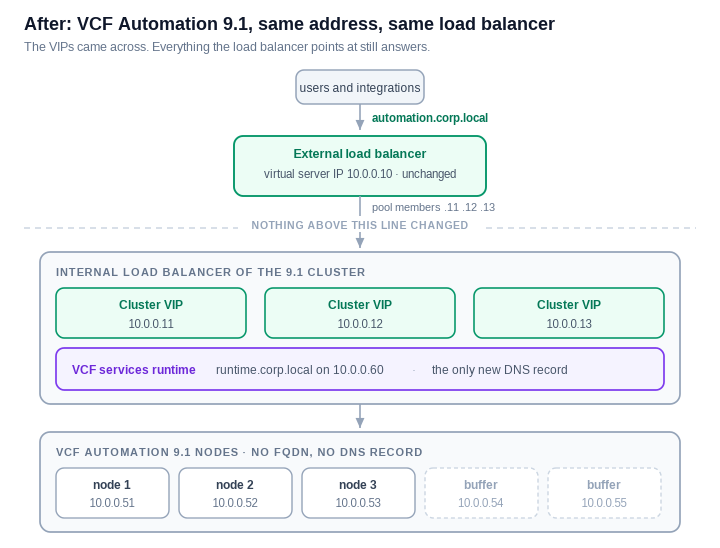
This is the picture that answers the question people actually ask.
The VCF Automation load balancer FQDN is untouched. The virtual server IP is untouched. The pool members are untouched, because .11, .12 and .13 still answer, they are simply being served by a different cluster now. The documentation puts it plainly: if your existing Automation instance uses an external load balancer, no changes in its configuration are required.
The addresses that do change hands are the 9.0.x node addresses, and they change hands by being given back. Once the source cluster is shut down, .41 through .44 are freed. Nothing in the new cluster uses them.
Which addresses need a DNS record
| Address | DNS record | Reserve it |
|---|---|---|
automation.corp.local | Already exists, unchanged | Yes |
| Primary and Additional VIPs | Not needed, they move as VIPs | Already yours |
| New node addresses, three of five | No | Yes |
| Buffer addresses, two of five | No | Yes |
| Services runtime address | Yes, the only new one | Yes |
| Old 9.0.x node addresses | Not needed, they are freed | Release them |
The rule underneath that table is the same one as last time:
An address that users or other systems reach needs a name. An address that only the cluster uses does not.
That is why the load balancer FQDN survives untouched, and why the single new name belongs to a component that only ever talks to other VCF components.
The one place this differs from the 8.x hop
| Where you came from | What happens to the existing node addresses |
|---|---|
| Aria Automation 8.18.x | Automatically assigned as VIPs for the 9.1 instance |
| VCF Automation 9.0.x | Freed after the upgrade |
Both of those sentences sit in the same paragraph of the documentation, and the reason for the difference is the shape you started with. An 8.18.x cluster has no VIPs of its own, so its node addresses have to become them. A 9.0.x cluster already has VIPs, so its node addresses have nothing left to do.
Do not delete the old cluster on the day
The upgrade shuts the source cluster down for you, and the documentation then says the old nodes can be deleted if they are no longer needed. Read that as permission rather than as the next step.
Leave them powered off in vCenter and validate first. Log in through the FQDN, confirm your cloud accounts validate, run a deployment, check your integrations and your identity provider. When you are satisfied, and not before, decommission the 9.0.x cluster.
Keeping four powered-off virtual machines for a week costs nothing. Finding a problem after you have deleted them costs you a restore.
What to ask your network team for
- Five addresses on the same network as the current nodes, reserved, no DNS records. Or a /29 block of eight if you are targeting 9.1.0.0 through 9.1.0.300.
- One FQDN with its own IP, outside that pool, for the VCF services runtime. This one does need a DNS record, in lower case.
- Nothing at all for the load balancer or the existing FQDN.
- Four addresses back, handed to them once you have finished validating and decommissioned the old cluster.
Sources
- Upgrading to VCF Automation 9.1
- Upgrade VCF Automation to 9.1
- Upgrade VMware Aria Automation to VCF Automation 9.0, for the 9.0.x Primary VIP, Additional VIPs and Cluster Node IP Pool fields
- First VCF Instance FQDNs and IP addresses
The 8.x version of this walk is in FQDNs and IPs When You Upgrade vRA 8.x to VCF Automation 9.1.
Never miss a post
New guides on VMware Cloud Foundation, Aria Suite, and infrastructure automation. Follow the blog in your feed reader and new posts show up as soon as they are published.
Using a different reader? Copy the feed URL and add it there.