FQDNs and IPs When You Upgrade vRA 8.x to VCF Automation 9.1

The question before every Automation upgrade is the same one: what do I have to change in DNS, and what do I have to change on the load balancer?
Nothing, and nothing. There is a downtime window, but it is not where most people expect it. Here is the whole thing in four pictures.
Where you start
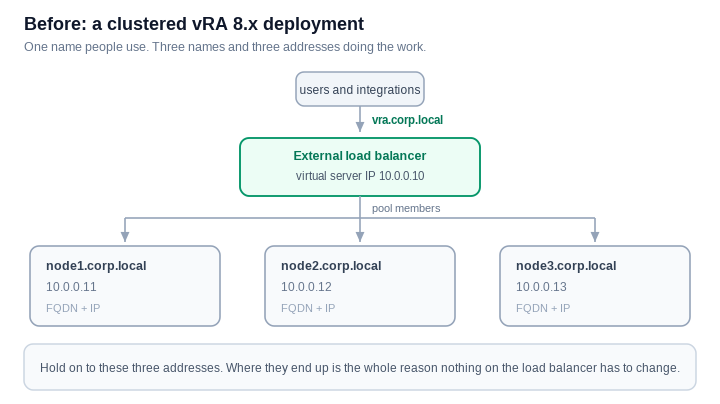
One name people use. Three names and three addresses doing the work.
Keep those three node addresses in mind. Where they end up is the whole trick.
What you hand over
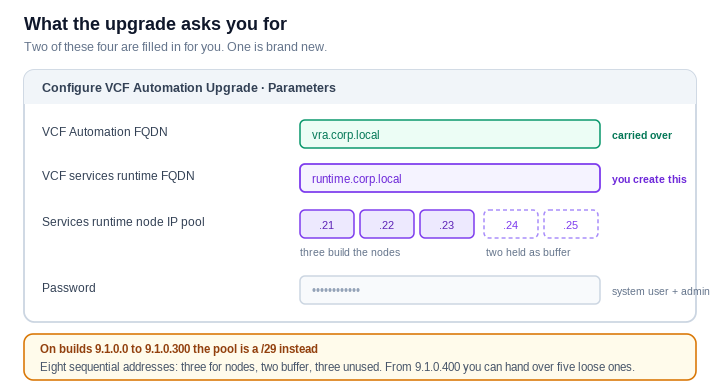
| Field | Where it comes from |
|---|---|
| VCF Automation FQDN | Carried over from your existing deployment, automatically |
| VCF services runtime FQDN | New. You create it, with its own IP outside the pool |
| Services runtime node IP pool | New. Five addresses: three build the nodes, two are buffer |
| Password | One password, for the vmware-system-user and admin@vsp.local accounts |
Two things worth knowing about that pool. The two buffer addresses are for automatic redeployment of a failed node and for rolling updates, so they are not spare capacity to borrow. And on builds 9.1.0.0 through 9.1.0.300 it is not five loose addresses at all, it is a /29 block of eight sequential ones, of which three go unused. From 9.1.0.400 you can supply five, contiguous or not.
What happens in the middle, and when you are down
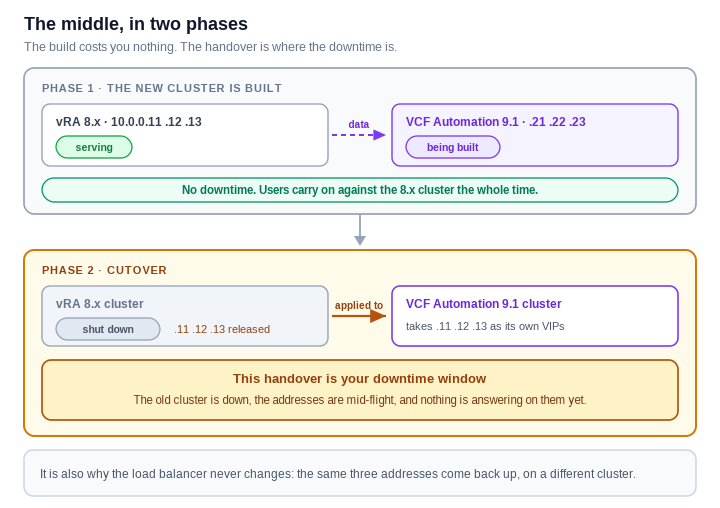
It runs in two phases, and only the second one costs you anything.
Phase one builds the new cluster on the addresses you supplied, while the 8.x cluster carries on serving. Data and configuration migrate across. Nobody notices, and you need headroom for both clusters at once.
Phase two is the cutover. The vRA 8.x cluster is shut down, its three addresses are released, and the new cluster takes them and applies them to itself. That handover is your downtime window. The old cluster is down, the addresses are mid-flight, and nothing is answering on them yet.
It is also the moment that makes the whole thing work. The same three addresses come back up on a different cluster, which is exactly why the load balancer never needs touching.
Where you end up
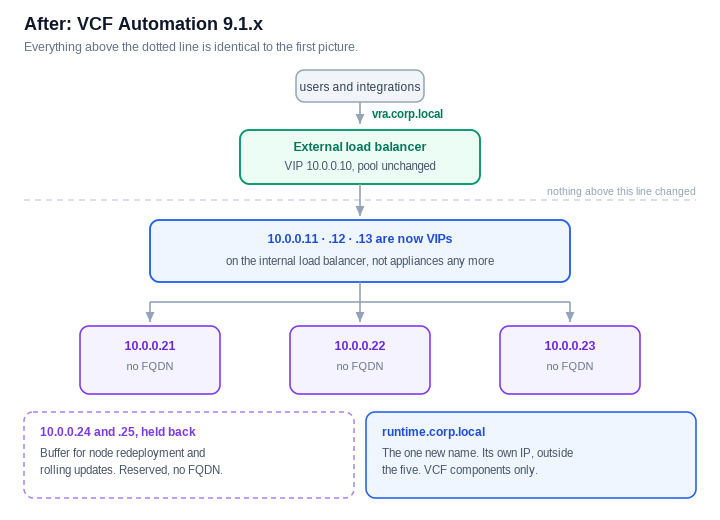
This is the picture that answers the original question.
Your three vRA 8.x node addresses are automatically assigned as VIPs for the 9.1 instance. Your load balancer pool is still pointing at .11, .12 and .13, those addresses still answer, and so the pool never needed touching. The appliances behind them changed. The addresses did not.
The certificate comes across too, and an external load balancer needs no configuration changes.
Which addresses need a DNS record
| Address | DNS record | Reserve it |
|---|---|---|
vra.corp.local | Already exists, unchanged | Yes |
Old node addresses .11 .12 .13 | Not needed, they become VIPs | Already yours |
| New node addresses, three of five | No | Yes |
| Buffer addresses, two of five | No | Yes |
| Services runtime address | Yes, the only new one | Yes |
The rule underneath that table is worth carrying around:
An address that users or other systems reach needs a name. An address that only the cluster uses does not.
That is why the load balancer FQDN survives untouched, why the node addresses stop needing names, and why the one new name belongs to a component that only talks to other VCF components. The documentation is explicit that the services runtime FQDN is used only internally and is not user-facing.
Reserving is a different question from naming. Every address above has to be set aside so nothing else claims it, record or no record. An address with no DNS entry is exactly the kind that gets handed to a new virtual machine six months later.
What to ask your network team for
- Five addresses on the same network as the current nodes, reserved, no DNS records. Or a /29 block of eight if you are targeting 9.1.0.0 through 9.1.0.300.
- One FQDN with its own IP, outside that pool, for the VCF services runtime. This one does need a DNS record. No capital letters in the FQDN.
- Nothing at all for the load balancer or the existing FQDN.
Sources
If you want the wider shape of the move rather than just the addressing, I wrote up the import and upgrade route in Skipping VCF Automation During a Brownfield Converge.
Never miss a post
New guides on VMware Cloud Foundation, Aria Suite, and infrastructure automation. Follow the blog in your feed reader and new posts show up as soon as they are published.
Using a different reader? Copy the feed URL and add it there.