Move VCF Automation 9.0.x to the Management Domain Before You Upgrade

The line sits in the middle of the VCF Operations upgrade page, in a paragraph headed "Upgrading from 9.0.x":
Before you begin the overall upgrade to 9.1.x, ensure your existing 9.0.x VCF Automation is deployed in the management domain and not in a workload domain.
One sentence, no heading of its own, easy to read straight past. Stop on it, because the order you do things in here decides how much work you are signing up for.
One thing up front rather than buried at the end: this is a procedure to run with Global Support alongside you. Not many environments land here, and nobody should be working through it alone.
How you ended up here
When customers adopted the fleet concept in 9.0.x, their vRA 8.x was wherever it happened to be. Any vCenter, very often a workload domain, because that is where the capacity was. There was no restriction, and there did not need to be one.
The VCF Operations fleet management appliance, OPS LCM as most of us call it, carried that flexibility forward. It imported those instances and upgraded them to VCF Automation 9.0.x and it did not care which domain they sat in.
Fleet lifecycle 9.1 is stricter. The component has to be on the management domain. That leaves the practical question of how you get it there.
Which situation are you in
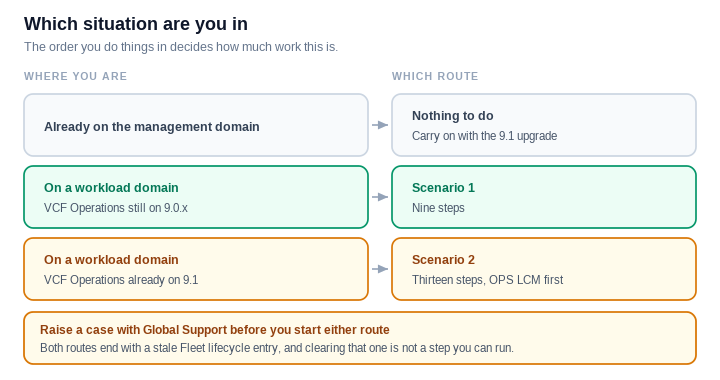
If your VCF Automation 9.0.x is already on the management domain, there is nothing in this post for you.
If it is on a workload domain and VCF Operations is still on 9.0.x, that is Scenario 1. Nine steps, and the tooling you need is still running.
If it is on a workload domain and you have already upgraded VCF Operations to 9.1, that is Scenario 2. The VCF Operations fleet management appliance was shut down during that upgrade, and some people will have gone further and deleted it to reclaim the space. Either way, you put one back before you can do anything else, which is why this route is thirteen steps rather than nine.
You cannot move it by moving the virtual machines
vMotion does not help here, and neither does a clone. The lifecycle service holds the component's registration against the deployment target it was installed on. Move the virtual machines underneath that and you have moved some files, not the component.
What does work is something the documentation already does elsewhere. In the VCF Automation failure scenarios table, the recovery for a cluster that has lost two or three nodes is to delete the component, deploy a new instance, and restore from SFTP to the new nodes. Same three moves, different reason for making them.
Before you start either route
Raise a case. This post explains the procedure. Running it is a different thing. One of the steps at the end is not even yours to run, and two of the steps in the middle are the kind you only get one go at.
Not many people will find themselves here. That is the reason to ask rather than press on. There is not much shared experience of this to fall back on.
Scenario 1: when VCF Operations is still on 9.0.x
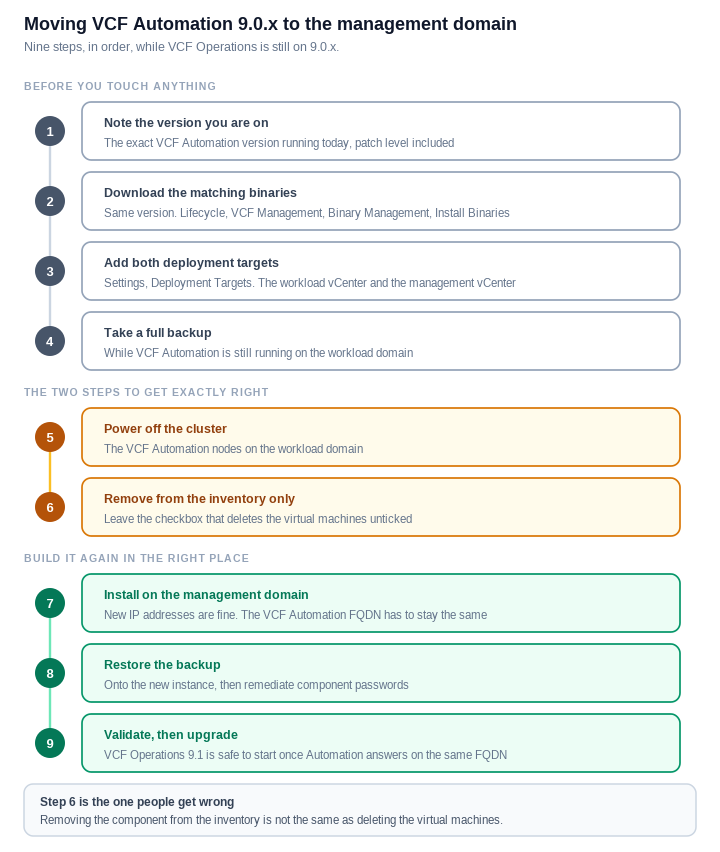
1. Note the version you are on. The exact VCF Automation version, patch level included. Everything after this hangs off that number.
2. Download the matching binaries. The same version you just noted, and install binaries rather than upgrade binaries. Once they have downloaded you will see them under Fleet Management, Lifecycle, VCF Management, Binary Management, Install Binaries.
3. Add both deployment targets. Fleet Management, Lifecycle, VCF Management, Settings, Deployment Targets. Both the workload vCenter and the management vCenter need to be in there, the first because that is where the instance is today, the second because that is where it is going.
4. Take a full backup. While VCF Automation is still running on the workload domain. This is the backup you restore in step 8, so it is the one that matters.
5. Power off the cluster. The VCF Automation nodes on the workload domain.
6. Remove it from the inventory, and only from the inventory. Slow down on this one. The removal wizard carries a checkbox that also deletes the virtual machines from vCenter. Leave it unticked. You are taking the component out of the OPS LCM inventory, not destroying it. Those powered-off virtual machines are your fallback, and that checkbox is what takes it away.
7. Install on the management domain. Same version, from the binaries you downloaded in step 2. The IP addresses do not matter, use whatever the management domain has free. The FQDN does matter, and it has to be the same one you had before. That is what lets the restore land on something the rest of your environment already recognises.
8. Restore the backup. Onto the new instance. Afterwards, remediate the component passwords, which the documentation treats as its own task after any VCF Automation restore.
9. Validate, then upgrade. Log in through the FQDN, check your cloud accounts validate, run a deployment, check your integrations. Once Automation is answering properly from the management domain, you are where 9.1 expects you to be, and the VCF Operations upgrade can start.
Scenario 2: when VCF Operations is already on 9.1
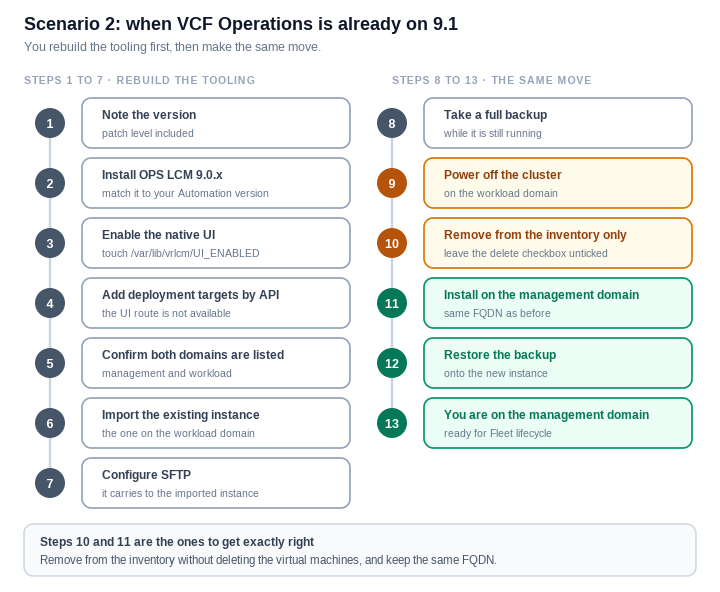
The second half of this is the same move you have just read. The first half is getting back the appliance that lets you make it.
1. Note the version you are on. Same as before, and here it decides which appliance you install next.
2. Install a VCF Operations fleet management appliance 9.0.x. It has to be a build that is compatible with the VCF Automation version you noted. If you are unsure which one that is, the Interoperability Matrix is the place to check rather than guess.
3. Enable its native UI. A fresh OPS LCM 9.0.x does not present its own interface until you ask it to:
touch /var/lib/vrlcm/UI_ENABLED
4. Add the deployment targets through the API. This is the part that catches people. The usual way in is through VCF Operations, and VCF Operations is on 9.1 now, so it no longer offers you a 9.0.x fleet management appliance to drive. You go in through the API instead.
5. Confirm both domains are listed. The management vCenter and the workload vCenter, same as Scenario 1 step 3. Check before moving on, because everything after this assumes both are there.
6. Import the existing VCF Automation. The instance running on the workload domain, into the OPS LCM 9.0.x you just built. This part is straightforward.
7. Configure SFTP. You deployed this appliance from scratch, so it has no backup target yet. Set one up, and the configuration carries through to the instance you have just imported.
8. Take a full backup. While VCF Automation is still up on the workload domain. This is the one you restore in step 12.
9. Power off the cluster. The VCF Automation nodes on the workload domain.
10. Remove it from the inventory, and only from the inventory. The same checkbox, the same warning. Leave it unticked, because those powered-off virtual machines are your fallback.
11. Install on the management domain. Same version. New IP addresses are fine, the FQDN has to stay the same.
12. Restore the backup. Onto the new instance, then remediate the component passwords.
13. You are on the management domain. That is where both routes meet.
Where both routes end
Whichever way you came, VCF Automation is now running on the management domain and VCF Operations is on 9.1. From here you import VCF Automation into Fleet lifecycle, then upgrade it to 9.1.
There is one thing waiting for you at that point. Fleet lifecycle will already hold an inventory entry for VCF Automation as it was, running from the workload domain. That entry has to come out before the import, and removing it is a support procedure rather than something exposed in the interface.
Ask for help with this one
What you have read here is the shape of the problem and the order of the moves. It is deliberately high level. No two of these environments are the same, the step that clears the Fleet lifecycle entry is not exposed to you, and a post cannot see your inventory.
So treat it as a map rather than a runbook. If your VCF Automation 9.0.x is sitting on a workload domain, raise a case before you touch anything, say which of the two routes you are on, and work through it with us. Do not sit on it and do not improvise around it.
Not many people will land in this scenario. If you are one of them, ask. We will help you out.
Sources
- Upgrading to VCF Operations 9.1, for the management domain requirement
- On-Demand Backup of VCF Automation
- Restore VCF Automation, for the failure scenarios table
- Remediate Passwords for VMware Cloud Foundation Components
- Upgrade Sequence and Related Issues for VCF and vSphere Foundation 9.1
- Broadcom Compatibility and Interoperability Matrix
Once Automation is in the right place, the addressing side of the 9.1 upgrade is covered in FQDNs and IPs When You Upgrade VCF Automation 9.0.x to 9.1.x.
Never miss a post
New guides on VMware Cloud Foundation, Aria Suite, and infrastructure automation. Follow the blog in your feed reader and new posts show up as soon as they are published.
Using a different reader? Copy the feed URL and add it there.