What VCF Automation 9.1.1.0200 Fixes

VCF Automation 9.1.1.0200 landed on 12 October 2026, build 25801570. Migration Service Engine 9.1.1.0200 shipped the same day on the same build number.
The two are not equal in weight. The Migration Service Engine patch contains security enhancements and lists no resolved issues. VCF Automation carries security enhancements, new versions of the VKSM Extensions and VKS Cluster Management Auto-Attach services, and fourteen resolved issues, five of which sit in the upgrade path.
Both are applied through VCF Operations, using the Upgrade or Patch an Individual VCF Component procedure.
The fourteen, at a glance
| Area | What was happening |
|---|---|
| Upgrade | Patching the Migration Service Engine first deadlocks both upgrades |
| Upgrade | 9.0.x to 9.1.1 database migration times out on session tables |
| Upgrade | Appliance on a non-primary datastore fails pre-upgrade validation |
| Upgrade | Custom profiles precheck fails on a leftover proxy-service directory |
| Upgrade | Upstream proxy configuration silently discarded during 8.18.x migration |
| Identity | Users lose logins or group permissions after vIDM to vIDB migration |
| Kubernetes | Retired 1.32.x VKS cluster cannot upgrade to 1.33.x |
| Kubernetes | Pod details page renders blank |
| Consumption | Custom resource actions disappear from the action list |
| Consumption | Orchestrate tab missing after the embedded orchestrator restarts |
| Licensing | Evaluation banner persists after a licensed vCenter 9.x is attached |
| Approvals | Notification says a request will be approved when it will actually be rejected |
| CLI | VCF CLI fails to find the plug-in inventory image with a regional Harbor registry |
| API docs | Swagger Servers dropdown shows an internal address |
The upgrade path
Patching the Migration Service Engine first
If the Migration Service Engine is patched before VCF Automation, both upgrades stop. The VCF Automation upgrade fails at the Migration Service Engine step with Step vmsp_upgrade failed, and the upgrade precheck reports either a failed backup check or a package deployment wait timeout.
The detail underneath is worth understanding. The VCD Migrator backup completes successfully, and then the step that deploys the new VCD Migrator Helm release waits indefinitely for the Helm chart pods and the Postgres instance to reach Ready. When the workflow deadline passes, the step is marked failed and the deployment is left in a Progressing state.
The release notes now state the rule plainly: the Migration Service Engine upgrade must be performed after the VCF Automation upgrade completes. Doing it the other way round creates a deadlock that blocks both.
If you are already in that position, I wrote up the way out separately in Patched the Migration Service Engine First? Here Is the Way Out.
The database migration timing out
Upgrading from 9.0.x to 9.1.1 could fail or time out during the database migration steps.
The cause is accumulation. The user_session and session_role tables collect expired rows, and if the session cleanup job has stopped running, those rows build up. The upgrade workflow deleted them one at a time, and on a large enough table that row-by-row DELETE exceeds the database's 30 second statement timeout.
The fix changes the operation rather than the timeout. The upgrade workflow now uses TRUNCATE on the session tables instead of deleting row by row, which completes in roughly constant time regardless of how many rows accumulated.
The datastore restriction is lifted, with a condition
This one is not a repair. It removes a limitation, and the condition attached to it is easy to miss.
Previously the upgrade workflow required the appliance to be deployed on the primary datastore of the primary cluster, and it automatically used that datastore for the target deployment. If your appliance sat on a separate datastore, pre-upgrade validation failed, because the storage migration process required source and target clusters to use the same datastore.
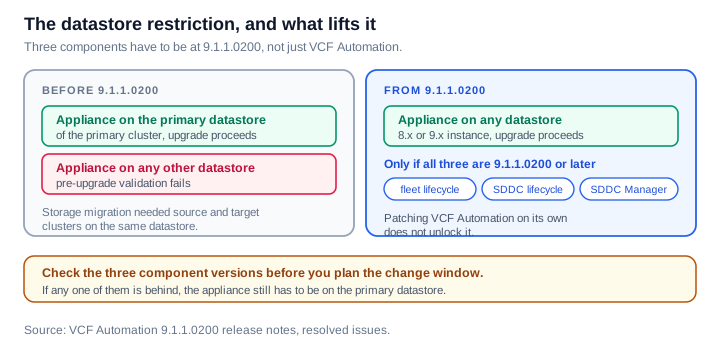
From 9.1.1.0200 you can upgrade an 8.x or 9.x Automation instance that is not on the primary datastore of the management domain primary cluster, provided your fleet lifecycle, SDDC lifecycle and SDDC Manager components are all on 9.1.1.0200 or later. All three. Patching VCF Automation alone does not unlock it.
A precheck that flagged a known leftover
Upgrading Aria Automation 8.18.1.x to VCF Automation 9.1.0.x or 9.1.1.0 could fail source validation with ERROR: Custom profiles detected: proxy-service, reported against the precheck com.broadcom.vcfa.upgrade.80.source.check.test-source-04-custom-profiles.
The precheck script treats any profile directory under /etc/vmware-prelude/profiles that is not owned by an RPM package as a customer-added custom profile, and blocks the upgrade when it finds one. The proxy-service directory is a known leftover from an earlier manual workaround for an IPAM and Infoblox DNS resolution issue. Because a manually created directory has no owning RPM, the precheck classified it as a custom profile.
The script now recognises and skips that specific directory. Every other unowned profile directory still blocks the upgrade, which is the right outcome. This was a false positive on one known path, not a relaxation of the check.
That precheck is one of the forty three in the framework, which I went through in VCF Automation Upgrade Prechecks, Explained.
The proxy that was discarded quietly
Of the fourteen, this is the one I would most want people to know about, because it reported success.
After upgrading Aria Automation 8.18.x to VCF Automation 9.x, the configured upstream proxy was not migrated. The migration workflow sent a malformed payload with mismatched field names to an internal API, the proxy migration failed, and the workflow still reported Upstream proxy migration completed successfully. The previously configured proxy settings were discarded.
You found out later, through symptoms that said nothing about proxies. Opening the cloud account page produced:
java.lang.RuntimeException: java.net.ProtocolException: unexpected end of stream
and validating a cloud account produced:
Unable to validate the provided access credentials
Both are what outbound calls look like after losing the proxy they depended on. If you upgraded from 8.18.x and have seen either message, check the proxy configuration before anything else.
Identity
Logins and group permissions after moving to Identity Broker
After the VCF Automation identity source is migrated from VMware Identity Manager to VMware Identity Broker, some users who previously had access could no longer log in, or kept access but lost the roles and permissions that came from their group membership.
The detail that makes this hard to spot is that the Access Management page still listed those users with their expected roles. The page said one thing and the session said another.
Kubernetes
Retiring a cluster, then upgrading it
After retiring a Tanzu Kubernetes Cluster running vSphere Kubernetes release 1.32.x, upgrading that cluster to 1.33.x failed. The admission webhook denied it:
admission webhook "capi.validating.tanzukubernetescluster.run.tanzu.vmware.com"
denied the request: Cluster's Kubernetes version v1.33.x+vmware.1-fips does not
meet the version requirements of ClusterClass
vmware-system-vks-public/builtin-generic-v3.1.0 set by annotations:
kubernetes.vmware.com/min-version-supported and
kubernetes.vmware.com/max-version-supported
The retire operation left the kubernetes.vmware.com/skip-auto-cc-rebase annotation in place. That annotation prevents the cluster from rebasing onto a newer ClusterClass, so when the upgrade asked for a version only the newer ClusterClass supports, validation refused it. The workaround was editing the cluster object by hand.
Pod details
In the organization portal, the path is Manage & Govern, then Kubernetes Management, then Clusters. Selecting a cluster, opening its Nodes tab and clicking a pod name produced a blank page instead of the pod details.
Consumption and everyday use
Custom resource actions disappearing
Custom resource actions for a deployment or a deployment resource such as Cloud.vSphere.Machine disappeared from the action list in the UI. This was not only a rendering problem. The deployment actions REST API also left the custom action out of its JSON response, while the built-in actions stayed present.
Opening Design, then Resource Actions, and saving the action restored it for a while, after which it disappeared again.
The Orchestrate tab after an orchestrator restart
After restarting the VCF Operations orchestrator embedded in VCF Automation, for example following a plug-in update, launching the Provider Consumption organization showed no Orchestrate tab, and workflows that had been visible there were no longer reachable.
The evaluation banner that would not clear
VCF Automation kept showing the licensing evaluation period banner after a fully licensed and healthy vCenter 9.x was attached, and the remaining days counter froze rather than clearing.
An approval notification that said the opposite
When a pending approval request is governed by a policy set to auto-reject on timeout, the Notifications dashboard widget said the request would be automatically approved. It would in fact be rejected when the timer expired.
The policy itself was always enforced correctly, and both the email notification and the Inbox Details page always said rejected. Only the dashboard widget disagreed.
VCF CLI with a regional Harbor registry
After deploying VCF Automation with a regional Harbor registry, any VCF CLI command failed to initialise, with an error that the plug-in inventory OCI image could not be found, which blocked installing or synchronising the recommended CLI plug-ins.
Swagger showing an internal address
Opening the API Help Center or Swagger UI for a service, for example Organization for VM Apps, showed localhost:8600 or a similar internal address in the Servers dropdown rather than the actual VCF Automation URL.
The specification files for several components, including Blueprints, Catalog, Deployments, Policies and Organizations for VM Apps, are generated and hosted statically with a hardcoded localhost server entry, which then carried through to the published documentation regardless of environment. This was a display issue only. The APIs themselves responded correctly when called directly.
What I would take from this patch
Three things.
The ordering rule is now documented, not folklore. VCF Automation first, Migration Service Engine second.
The datastore unlock needs three components, not one. Fleet lifecycle, SDDC lifecycle and SDDC Manager all on 9.1.1.0200 or later, or the restriction still applies.
If you upgraded from 8.18.x, check your proxy. The migration said it succeeded. The symptoms that follow do not mention proxies, so the connection is not obvious from the error alone.
Sources
Never miss a post
New guides on VMware Cloud Foundation, Aria Suite, and infrastructure automation. Follow the blog in your feed reader and new posts show up as soon as they are published.
Using a different reader? Copy the feed URL and add it there.